


Overview
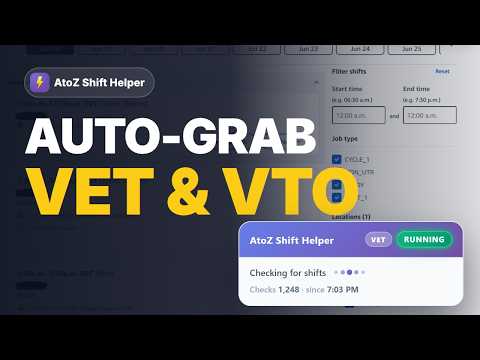
Stop refreshing Amazon AtoZ. Auto-add VET, READY shifts and VTO that fit your filters — the moment they appear. 100% Free.
AtoZ Shift Helper — auto-grab VET, READY shifts & VTO you actually want. Good VET / READY shifts and VTO get taken in seconds. By the time you open the AtoZ app or refresh, someone's already grabbed them. Isn't it? AtoZ Shift Helper watches AtoZ for you and automatically claims the opportunities that match your exact schedule — the instant they post. Set your filters once, hit Start, and let it work. TWO MODES • VET / READY — automatically picks up Voluntary Extra Time and READY shifts the moment they become available (on your Find Shifts page). • VTO — automatically accepts Voluntary Time Off the second it opens (on your VTO page). It only ever acts on what you asked for — nothing else gets touched. GRABS EXACTLY WHAT FITS YOUR LIFE • Warehouse time zone — it picks up your warehouse's time zone from AtoZ automatically, so every filter below matches your site's clock, even if your computer is set to another zone. You can still choose one yourself. • Date ranges — only consider shifts on the dates you choose (add as many as you like). Leave it off and it looks up to 60 days ahead. • Days of the week — weekends only, just Mondays and Thursdays, or any combination. • Priority shifts — rank your favourite time slots P1, P2, P3… and it always grabs your P1 shifts first, then P2, then the rest (longest first). • Allowed hours — a hard filter: a shift is only grabbed if it fits completely inside your hours. Night windows that cross midnight are handled correctly. This controls when a shift runs, not how long it is — that's the next one. • VET / VTO length — Amazon often posts a full shift and the halves it splits into, and both fit inside your allowed hours. Set a 10-hour minimum and it takes the full one only. Set a maximum instead if short shifts are all you want. • Departments — trained in more than one department? Tick the ones you want VET for and it skips the rest. New departments are added to your list as they turn up. (VET / READY only.) • Check frequency — choose how often it looks for VET / VTO: every 0.5s, 1s, 2s or 5s, or Random, which waits a fresh 0–5 seconds before each check so your checks don't follow a fixed rhythm. On a stable connection 0.5s gives you the best odds; the slower settings are easier on a weak one. WHY IT WINS THE GRAB While running, it checks AtoZ on a tight loop — as often as twice a second — and claims matching shifts in well under a second. That's the difference between getting the shift and watching it disappear. A clean status panel sits right on the AtoZ page so you can see it working (Running / Idle). Your settings save automatically and are remembered every time. STAYING SIGNED IN AtoZ Shift Helper does not log you in and never sees your password. To keep things going, it automatically clicks AtoZ's "Stay logged in" prompt for you whenever it appears — so a normal idle timeout won't knock you out mid-watch. The most common cause of being logged out is a brief Wi-Fi hiccup, so a stable internet connection keeps it running for hours. If AtoZ does sign you out, the extension can't log you back in — just sign in to AtoZ manually as you normally would and press Start again. HOW IT WORKS Install (free, ~30 seconds). Open the popup, pick VET or VTO, and set your filters. Open your AtoZ Find Shifts (VET) or Voluntary Time Off (VTO) page and hit Start. WHAT YOU NEED • An active Amazon AtoZ account • Google Chrome YOUR PRIVACY Everything runs locally in your browser. Your filters are stored on your device only and are never sent to us. The extension talks only to AtoZ's own scheduling pages to read and claim shifts on your behalf — it never touches your activity on other sites. SUPPORT Questions? Email support@qwicktry.com — we reply within 24 hours. NOT AFFILIATED WITH AMAZON Qwicktry and AtoZ Shift Helper are independent and are not affiliated with, endorsed by, sponsored by, or in any way officially connected with Amazon, Amazon.com, Inc. or any of its subsidiaries or affiliates. "Amazon," "AtoZ," and related names and marks belong to their respective owners.
5 out of 56 ratings
Details
- Version3.4.5
- UpdatedOctober 30, 2026
- Size268KiB
- LanguagesEnglish (United States)
- DeveloperWebsite
Email
support@qwicktry.com - Non-traderThis developer has not identified itself as a trader. For consumers in the European Union, please note that consumer rights do not apply to contracts between you and this developer.
Privacy

This developer declares that your data is
- Not being sold to third parties, outside of the approved use cases
- Not being used or transferred for purposes that are unrelated to the item's core functionality
- Not being used or transferred to determine creditworthiness or for lending purposes
Support
For help with questions, suggestions, or problems, please open this page on your desktop browser