

AST Terminal Toolkit

Overview
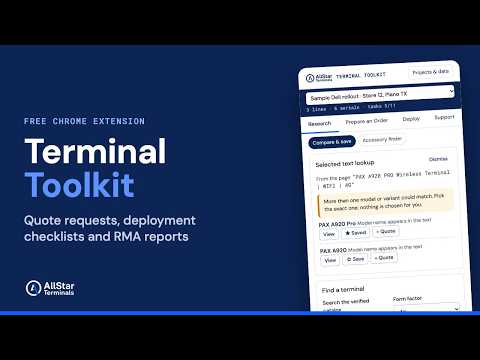
Plan, order, deploy and support payment terminals: quote requests, deployment checklists, serial cleanup and RMA reports.
AST Terminal Toolkit helps teams that put payment terminals into service plan the hardware, request quotes, track deployments and prepare support requests, all from Chrome's side panel. Built for ISOs, payment processors, resellers, ISVs and merchants who deploy card terminals and PIN pads. PREPARE AN ORDER • Build a hardware quote request: manufacturer, model, exact part number, quantity and condition • Record processor, payment application, configuration and key-injection needs ("unknown / need assistance" is always an option) • Add cables, power supplies, stands, cradles and other accessories • Set a requested delivery date, shipping requirements and deployment notes • Copy it, download it, print or save it as PDF, or open an email draft to Allstar Terminals. You review and send the email yourself. • It is a request, not a quotation: the toolkit never shows or invents prices, stock or lead times. DEPLOY • Reusable deployment checklist: complete, incomplete, not applicable or needs clarification, with notes and custom items • Duplicate a project for the next location • Serial number cleaner: paste a list or import a CSV, preview every change, find blank rows and exact duplicates, and export CSV or text. Leading zeros and original formatting are kept. CSV exports are protected against spreadsheet formula injection. SUPPORT • Organize a support or RMA request for one or many devices: model, part number, serial, order reference, exact error message, when it started and what was tried • Copy, print, export or open an email draft to Allstar support. Preparing a report does not approve a return or establish warranty coverage. RESEARCH • Search a catalog of 141 payment terminals, with specs taken from manufacturer documents, each with source links and a verification date. Fields a source does not state show "Not verified". • Save a shortlist and compare up to three models side by side • Select a model name on any page, right-click, and look it up. When several variants match, you choose; nothing is assigned for you. • Accessory finder: see accessories the manufacturer names for an exact model, marked confirmed, conditional or not verified. Ask Allstar to confirm anything else. PRIVATE BY DESIGN • No account, no sign-up, no analytics, no tracking • Your projects stay in your browser. Nothing is uploaded. • Export and import your projects as a file for backup • The toolkit warns you if text looks like a card number, encryption key or password, and blocks sharing until it is removed By Allstar Terminals, Plano, Texas. allstarterminals.com
0 out of 5No ratings
Details
- Version1.0.0
- UpdatedOctober 22, 2026
- Offered byAllstar Terminals
- Size217KiB
- LanguagesEnglish
- DeveloperAbdulaziz Rashid
7904 Case Dr Plano, TX 75025 USEmail
support@allstarterminals.comPhone
+1 214-463-0139 - TraderThis developer has identified itself as a trader per the definition from the European Union and committed to only offer products or services that comply with EU laws.
Privacy

AST Terminal Toolkit has disclosed the following information regarding the collection and usage of your data. More detailed information can be found in the developer's privacy policy.
AST Terminal Toolkit handles the following:
This developer declares that your data is
- Not being sold to third parties, outside of the approved use cases
- Not being used or transferred for purposes that are unrelated to the item's core functionality
- Not being used or transferred to determine creditworthiness or for lending purposes
Support
For help with questions, suggestions, or problems, visit the developer's support site