


Overview
Your assistant in every new tab — timer, todos, weather, quotes & shortcuts. Stay on track. Privacy-first, no account required.
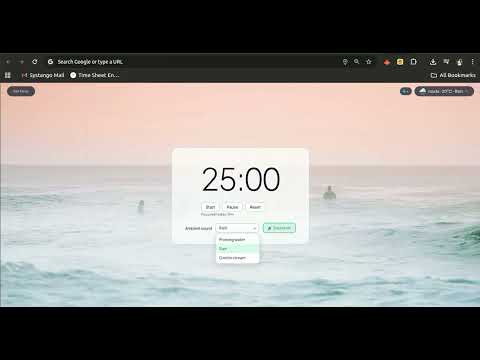
Your Dashboard. Your Rules. Welcome to Assist Tab, where every new tab brings new focus. 🚀 Turn your browser into a productivity hub with tasks, focus tools, and time management, all in one place. No clutter. No distractions. Just what you need, exactly when you open a tab. ✨ Why Assist Tab? • Stay focused from the moment your browser opens • Manage tasks effortlessly • Track time without switching apps • Boost productivity in every tab Your dashboard is ready. Your focus starts here. 👉 Try Assist Tab and take control of every new tab. 🎯 FOCUS TIMER Stay productive with a built-in Pomodoro-style focus timer. Set 25-minute sessions (or continue from where you left off), track your "Focused today" total, and get notification alerts when a session completes. The timer persists even if you close the tab—perfect for deep work. Start, stop, and reset with one click. Optional ambient sounds (rain, water, stream) during focus mode help you concentrate. ✅ TO-DO LIST Manage your tasks right from your new tab. Add, complete, and remove todos with due dates. Todos sync across your Chrome profile so you see them everywhere. Keep your workflow organized without leaving your browser. 📅 TODAY'S MEETINGS (GOOGLE CALENDAR) See your Google Calendar events for today at a glance. Sign in with your Google account to view meetings, reminders, and agenda items. Read-only access—we never modify your calendar. Perfect for staying on schedule without switching tabs. 🔍 SEARCH BAR Search the web with one click. Choose your default Chrome search (respects your browser settings) or switch to Google, Bing, or DuckDuckGo. Built for speed—no extra clicks, no clutter. 🔗 SHORTCUTS Quick access to your favorite sites. Add custom names and URLs for bookmarks you use daily. Edit, reorder, and remove shortcuts anytime. Your most-used sites are one click away from every new tab. 🌤️ WEATHER Get local weather and air quality on your dashboard. Enter your city or use geolocation for automatic updates. See temperature, conditions, and forecast without opening another app. 💬 DAILY QUOTE Start each day with an inspiring quote. Motivational wisdom from ZenQuotes and Quotable. Refresh for a new quote anytime. 🖼️ BACKGROUND IMAGES Beautiful, curated backgrounds from Unsplash. Choose from different categories or let the extension choose a stunning image for your new tab. Customize your space with themes: light, dark, or ocean. ✂️ HIDDEN ELEMENTS Remove distracting elements from any webpage. Use the extension popup to click and hide unwanted elements (ads, sidebars, popups). Your choices are saved per site—once hidden, they stay hidden until you unhide them. Perfect for decluttering your browsing. 🎨 COLOR PICKER Extract colors from any webpage. Click the extension icon, pick a color from the page, and get the hex code instantly. See page theme colors (background, text, accents) and copy them. Recent colors are saved for quick access. Ideal for designers and developers. ♿ ACCESSIBILITY CHECKER Run a lightweight accessibility audit on any page. Check for contrast issues, missing alt text, and other common a11y problems. Results appear in the popup and are saved for review on your new tab dashboard. Improve your sites for all users. ⚙️ TECH STACK DETECTOR See what technologies power any website. Automatically detects popular frameworks, libraries, content management systems, and development tools used on any page. Useful for developers researching sites or auditing technology choices. 🌳 DOM TREE Visualize the DOM structure of any page. See the hierarchy of elements, layout info (flex, grid), and selectors. Break down complex pages and understand structure at a glance. 🔬 INSPECT ELEMENT Click any element on a page to get its selector, component name (if available), and source location. DevTools-style inspection without opening DevTools. Great for debugging and learning from other sites. 🧪 API TESTER Test REST APIs directly from your new tab. No Postman or external tools needed. Send GET, POST, PUT, PATCH, DELETE requests with custom headers and JSON body. View status codes and responses. Import from cURL—paste a cURL command from browser DevTools or docs and instantly populate the request. Perfect for developers testing endpoints. 📝 QUICK NOTES Jot down ideas, meeting notes, or snippets. Auto-saves to local storage. No account, no sync—just your notes when you need them. 📄 PAGE SUMMARIZER Summarize any webpage in seconds. Extract key points with smart extractive summarization. Optional AI summarization with your own OpenAI or Google Gemini API key—stored locally, never sent to us. View summaries on your new tab dashboard. Cached per site for quick access. 📸 SCREENSHOT Capture the visible area of any tab. Download as PNG or copy to clipboard. Quick captures for documentation, sharing, or reference. ⏺️ SCREEN RECORDER Record your screen or a browser tab as video or GIF. Open the recorder from the extension popup, choose screen or tab, then start and stop with one click. Export as WebM or as an animated GIF for quick shares. No extra software or sign-up, everything runs in the browser. 🧩 CUSTOMIZABLE DASHBOARD Show or hide any widget. Reorder by drag-and-drop. Your dashboard, your way. Hover over widgets to reveal hide and drag controls. 🔒 PRIVACY-FIRST No account required. Data stored locally in Chrome. No analytics, no tracking, no server-side data collection. Optional features (Calendar, AI summarization) use your own credentials—we never see them. What's new in v1.2.0 How to use - New "How to use" menu next to Widgets with step-by-step instructions and accordion guide for every widget. Time format - Clock follows your system 12/24-hour setting; click the edit icon by the time to switch and save. Unlimited background refreshes - Change Unsplash background anytime (no daily limit when using a production key).
5 out of 56 ratings
Details
- Version1.2.0
- UpdatedFebruary 22, 2026
- Offered bymmn
- Size5.51MiB
- LanguagesEnglish (United Kingdom)
- Developer
Email
mmnauman786@gmail.com - Non-traderThis developer has not identified itself as a trader. For consumers in the European Union, please note that consumer rights do not apply to contracts between you and this developer.
Privacy

Assist Tab has disclosed the following information regarding the collection and usage of your data. More detailed information can be found in the developer's privacy policy.
Assist Tab handles the following:
This developer declares that your data is
- Not being sold to third parties, outside of the approved use cases
- Not being used or transferred for purposes that are unrelated to the item's core functionality
- Not being used or transferred to determine creditworthiness or for lending purposes
Support
For help with questions, suggestions, or problems, please open this page on your desktop browser