


Overview
Adaptive learning tools with Text-to-Speech, AI assistance, and accessibility features for all learners
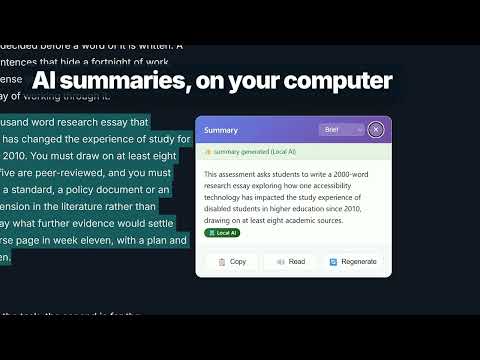
AssisT is a free, open-source reading and writing toolkit for students, built for neurodivergent learners and anyone who finds long pages hard going. It works inside Canvas, Moodle and Google Classroom, and on any other site you choose to allow. READ - Read Aloud with each word highlighted as it is spoken - Reading Mode, Reading Guide, Reading Progress and Word by Word - Dyslexia Mode, text spacing and font controls, colour overlays and Focus Mode - Read from Images (OCR) for text in pictures and scanned PDFs - Maths Support that reads equations aloud WRITE - Speech-to-Text dictation into course text boxes - Citations: save sources as you read and copy them in common referencing styles - Mind Map: plan an essay as an outline or a map, entirely from the keyboard if you like - Sticky Notes and highlights that stay on the page UNDERSTAND - Look up a word, translate a page, or have a passage summarised or put into plainer words - Lecture captions: live captions and notes from your microphone, on any lecture page - AI features are off until you switch them on. You choose: AI running on your own computer, AI in the browser, or a cloud service with your own key YOUR DATA STAYS WITH YOU AssisT has no accounts, no tracking and no adverts. Your settings and notes are stored in your browser. Nothing you select on a page is sent to any online service until you say yes, and AssisT asks about each service by name the first time it would be used. You can change your mind in the popup at any time. ACCESSIBLE BY DESIGN Built against WCAG 2.2 AA. Every control works from the keyboard, and the settings you pick are kept between visits. KNOWN LIMITATION Google Docs, Sheets and Slides draw their documents in a way extensions cannot read, so selecting words and word-by-word highlighting do not work inside those editors. We are looking for a fix. Google Classroom pages are not affected. Privacy policy: https://fiavaion.com/products/assist/privacy Source code: https://github.com/Fiavaion/AssisT
0 out of 5No ratings
Details
- Version1.0.0
- UpdatedOctober 13, 2026
- Size17.67MiB
- LanguagesEnglish
- DeveloperWebsite
Email
info@fiavaion.com - Non-traderThis developer has not identified itself as a trader. For consumers in the European Union, please note that consumer rights do not apply to contracts between you and this developer.
Privacy

AssisT: Adaptive Augmentative Tool has disclosed the following information regarding the collection and usage of your data. More detailed information can be found in the developer's privacy policy.
AssisT: Adaptive Augmentative Tool handles the following:
This developer declares that your data is
- Not being sold to third parties, outside of the approved use cases
- Not being used or transferred for purposes that are unrelated to the item's core functionality
- Not being used or transferred to determine creditworthiness or for lending purposes
Support
For help with questions, suggestions, or problems, visit the developer's support site