

Assign Watch - Extension for LEB2
17 ratings
)
Overview
View all your assignments in LEB2 in one place.
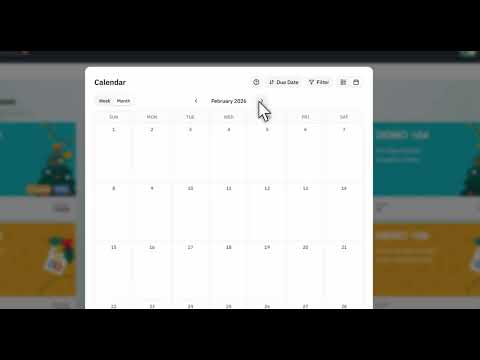
Never miss another midnight deadline. Tired of clicking into 6 different course pages on LEB2 just to check if you have homework due tonight? Assign Watch aggregates all your assignments and quizzes across every enrolled class into one organized dashboard and interactive calendar. Seamlessly integrated into LEB2—just click the new "Assignments ✨" button on your top navigation bar or press "Alt + A" to view everything instantly. Features: - Unified Dashboard: See assignments and quizzes from all your courses in a single view. - Calendar View: Visualize deadlines with interactive weekly and monthly views. - Deadline Alerts: Get notified 24 hours and 1 hour before due dates. - Customizable: Group by class or due date, hide dropped courses, and filter out completed tasks. - Quick Access: Click "Assignments ✨" in the LEB2 navbar or press Alt + A (Option + A on Mac). - Private & Secure: 100% local storage. No external servers or tracking. - Bilingual: Available in English and Thai.
4.9 out of 517 ratings
Details
- Version1.6.1
- UpdatedOctober 4, 2026
- Offered bythrxpt
- Size640KiB
- Languages2 languages
- Developer
Email
treeraphat234@gmail.com - Non-traderThis developer has not identified itself as a trader. For consumers in the European Union, please note that consumer rights do not apply to contracts between you and this developer.
Privacy

This developer declares that your data is
- Not being sold to third parties, outside of the approved use cases
- Not being used or transferred for purposes that are unrelated to the item's core functionality
- Not being used or transferred to determine creditworthiness or for lending purposes
Support
For help with questions, suggestions, or problems, visit the developer's support site