

asRobo
2 ratings
)
Overview
Capture, review, and prepare product drafts for Shopify and eBay.
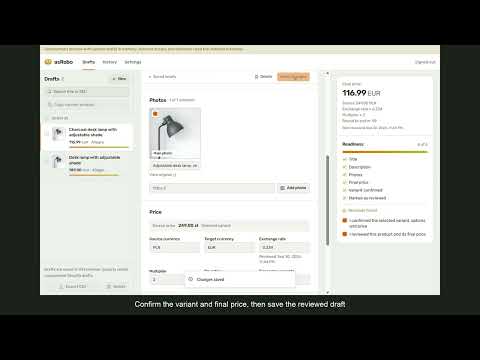
asRobo helps you capture product information from supported Allegro and AliExpress pages, review it in a local workspace, and prepare Shopify and eBay listings. Capture and review Use Copy on a supported product page to save a draft. Review and edit the title, rich description, price, currency, selected variant and photos before delivery. Choose and reorder photos, keep multiple drafts, and compare a new capture with your saved draft without losing your edits. Drafts remain on your device when you close the popup or sign out. Prepare a listing Open a supported Shopify or eBay listing form and use Paste to prepare selected fields. asRobo reports which fields and images were prepared. You review the result, complete any remaining listing details, and save or publish in the destination. Shopify CSV export Export reviewed drafts as Shopify CSV after confirming that the destination store uses the same currency. Import the CSV in Shopify and review the resulting drafts before publishing. Each draft contains one reviewed variant; asRobo does not infer a full supplier variant group. Pricing and shortcuts Review ambiguous or promotional source prices before delivery. Currency conversion and price adjustments are explicit choices. Default keyboard shortcuts are Ctrl+Shift+1 for capture, Ctrl+Shift+2 for form preparation, and Ctrl+Shift+3 for the workspace. Customize them in Chrome's extension shortcut settings. Account and access Sign in through the asRobo website. Capture and form preparation require eligible account access. Available plans and trial terms are shown on the website. Manage your account and billing from the workspace settings. Use only product content you own or have permission to reuse. asRobo assists with listing preparation; it does not publish listings automatically or synchronize supplier inventory, orders or fulfillment.
5 out of 52 ratings
Details
- Version2.0.1
- UpdatedOctober 1, 2026
- FeaturesOffers in-app purchases
- Offered byusackasbiz
- Size498KiB
- LanguagesEnglish
- Developer
Email
usackasbiz@gmail.com - Non-traderThis developer has not identified itself as a trader. For consumers in the European Union, please note that consumer rights do not apply to contracts between you and this developer.
Privacy

asRobo has disclosed the following information regarding the collection and usage of your data. More detailed information can be found in the developer's privacy policy.
asRobo handles the following:
This developer declares that your data is
- Not being sold to third parties, outside of the approved use cases
- Not being used or transferred for purposes that are unrelated to the item's core functionality
- Not being used or transferred to determine creditworthiness or for lending purposes
Support
For help with questions, suggestions, or problems, please open this page on your desktop browser