

Ask Jev

Overview
Ask fast probabilistic questions about the page you are viewing.
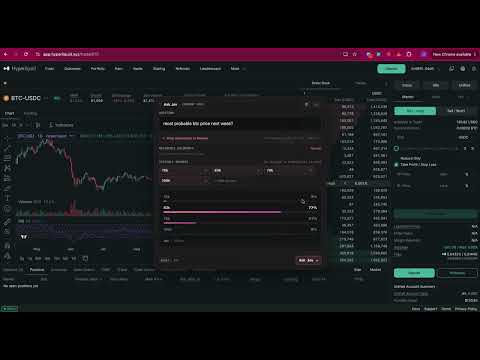
Ask any webpage a question and get an answer in a second. Free to use, no account and no API key required. Ask Jev brings TypeSafe's Jev model to any page in Chrome. Press a shortcut, type your question, and get a probability for each possible answer instead of a wall of text. Useful for reading long documents, proposals, papers, PDFs, and docs when you only need one answer. HOW IT WORKS Ask Jev uses Jev's native Choice API: you supply the question and the possible answers, and Jev returns a probability for each. Default choices are YES, NO, and UNCLEAR. Edit them or add your own to fit the question, like HIGH / MEDIUM / LOW risk. - Free questions every day with no API key and no signup. Settings shows how many are left - Ask about the whole page, or select text to ask about just that part - Ask questions about a PDF: drag in up to three documents (PDF, TXT, Markdown, JSON, or CSV) as extra context - Save reference documents in Settings and attach them to any question, on any page - Paste your own TypeSafe API key for unlimited questions - Keyboard-first: Command+J on macOS, Ctrl+Shift+K on Windows and Linux, Enter to ask, Escape to close EXAMPLES - Does this governance proposal change how fees are distributed? - Does this paper use a control group? - Does this contract auto-renew? - Is this documentation talking about the version I'm using? PRIVATE BY DESIGN - Documents are parsed locally in your browser. Raw files are never uploaded - Only the text relevant to your question is sent - With no API key, that text goes to the Ask Jev proxy, which forwards it to TypeSafe and does not store your question or the page text - With your own API key, it stays on your device and is sent only to api.typesafe.ai - No advertising, no accounts, no sale of data REQUIREMENTS None. A TypeSafe API key is optional: leave it blank to use the free daily allowance, or paste your own key on the options page for unlimited questions. NOTE ON THIS UPDATE This version asks Chrome for permission to contact https://ask-jev-backend.vercel.app, which is how free questions work. Chrome turns the extension off until you allow that address. Ask Jev is an independent project. It is not affiliated with, endorsed by, or sponsored by TypeSafe AI. Jev and TypeSafe are trademarks of their respective owners.
0 out of 5No ratings
Details
- Version0.3.0
- UpdatedSeptember 27, 2026
- Size1.79MiB
- LanguagesEnglish
- Developer
Email
jmhm2012@gmail.com - Non-traderThis developer has not identified itself as a trader. For consumers in the European Union, please note that consumer rights do not apply to contracts between you and this developer.
Privacy

Ask Jev has disclosed the following information regarding the collection and usage of your data. More detailed information can be found in the developer's privacy policy.
Ask Jev handles the following:
This developer declares that your data is
- Not being sold to third parties, outside of the approved use cases
- Not being used or transferred for purposes that are unrelated to the item's core functionality
- Not being used or transferred to determine creditworthiness or for lending purposes