

ArtiShare

Overview
Invite saved lists of email addresses to claude.ai artifacts in bulk.
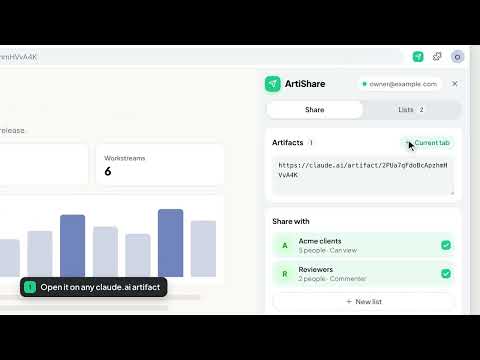
ArtiShare invites whole groups of people to your claude.ai artifacts in a few clicks. Save the email addresses you share with often as lists, each with its own permission: can view, can comment or can edit. Then paste one or more artifact links, tick the lists, and ArtiShare sends the invitations. You don't add people one by one in the Share menu, and you don't have to make the artifact public. How it works • Open claude.ai, sign in, and click the ArtiShare icon to open the side panel. • Lists: give a list a name, add email addresses and pick a permission. • Share: add artifact links, or the claude.ai tab you're on, and tick the lists to share with. • Preview: see who will be invited and who already has an invitation. Nothing is sent yet. • Send: the invitations go out one at a time, and you can follow each one. Good to know • Your own address is skipped, and so is anyone who already has an invitation. • If someone is in two lists, they get the higher of the two permissions. • Rate limits are handled. The run waits and retries when claude.ai asks it to slow down, and stops after repeated failures. You can resume a stopped run. • claude.ai's own sharing limits apply. For example, an artifact can have at most 50 people from outside your organization, and each account has a daily invitation limit. Privacy Your lists stay in your browser's local storage. ArtiShare talks only to claude.ai, from your own signed-in tab. It has no analytics or tracking. Email sharing on claude.ai is in beta and has no public API. ArtiShare uses the same requests as the Share menu, so a change on claude.ai's side can break it. ArtiShare is an independent tool. It isn't made, endorsed or supported by Anthropic.
0 out of 5No ratings
Details
- Version0.2.0
- UpdatedNovember 12, 2026
- Offered byTùng Nguyễn Văn
- Size204KiB
- LanguagesEnglish
- Developer72 Cổ Mân Cúc 3 Hòa Xuân, Da Nang City 550000 VN
Email
vantung220902@gmail.com - Non-traderThis developer has not identified itself as a trader. For consumers in the European Union, please note that consumer rights do not apply to contracts between you and this developer.
Privacy

ArtiShare has disclosed the following information regarding the collection and usage of your data. More detailed information can be found in the developer's privacy policy.
ArtiShare handles the following:
This developer declares that your data is
- Not being sold to third parties, outside of the approved use cases
- Not being used or transferred for purposes that are unrelated to the item's core functionality
- Not being used or transferred to determine creditworthiness or for lending purposes
Support
For help with questions, suggestions, or problems, visit the developer's support site