


Overview
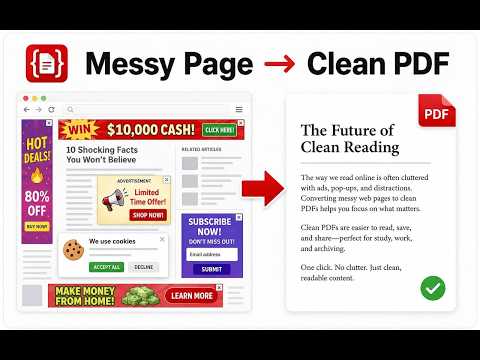
Save a website, web page, or article as a clean PDF. No ads, no sidebars, no clutter - just the content you want.
Save web pages, articles, and blog posts as clean, readable PDFs without ads, sidebars, or subscription pop-ups. Keep useful articles for offline reading, research, or printing. Article to PDF gives you searchable text, clickable links, and images in a PDF that's easy to read and share. Save in one click with Quick Save, or remove unwanted content before downloading. 📄 WHAT YOU GET • Clean articles: keep the text, headings, and images without the surrounding clutter • Faster saving: Quick Save uses your preferred PDF settings, including any edits you've already made • Easy editing: remove unwanted sections and restore them with Undo • Flexible reading: standard pages for printing or One long page for continuous reading • Your choice of format: A4 or Letter, in portrait or landscape • Remembered preferences: save your favorite PDF settings, sync them through your browser, and adjust the layout for individual articles • Edits that stay with you: reopen the preview on the same page with your edits and Undo history intact, until you reload, leave the page, or close the tab • More of the article: captures images that appear as you scroll, where the page allows 🔒 YOUR DATA STAYS YOURS Article processing runs in your browser. Your articles and PDFs are never uploaded. No account, no tracking. If you use a Pro license, we store it in your browser and verify it with our payment provider. Optional feedback is always your choice. 🌍 SPEAKS YOUR LANGUAGE The extension is available in multiple languages and picks the right one automatically. PAGE COMPATIBILITY Works best on pages with a clear article body. Results depend on the page and its available images. Some articles may be too tall or wide, or have missing images, for One long page; standard pages offer an alternative. FREE & PRO Free during launch: all features are currently unlocked, including Quick Save, full multi-page export, and One long page. No payment card or license key is required. Launch access does not automatically become a paid subscription. After launch, Pro will unlock all pages, Quick Save, and One long page. A4/Letter and portrait/landscape settings will remain available without Pro. Planned prices: US$4.99/month, US$19.99/year with a 3-day trial, or US$39.99 as a one-time lifetime purchase. Paid checkout will be handled outside the extension store. Price, taxes, and renewal terms will be shown before you buy. Found a site that doesn't extract well? Send us the page URL through the store's support contact so we can investigate.
0 out of 5No ratings
Details
- Version1.2.6
- UpdatedOctober 19, 2026
- FeaturesOffers in-app purchases
- Size139KiB
- Languages14 languages
- DeveloperWebsite
Email
support@article-to-pdf.com - Non-traderThis developer has not identified itself as a trader. For consumers in the European Union, please note that consumer rights do not apply to contracts between you and this developer.
Privacy

Article to PDF — Web Page to PDF, No Ads has disclosed the following information regarding the collection and usage of your data. More detailed information can be found in the developer's privacy policy.
Article to PDF — Web Page to PDF, No Ads handles the following:
This developer declares that your data is
- Not being sold to third parties, outside of the approved use cases
- Not being used or transferred for purposes that are unrelated to the item's core functionality
- Not being used or transferred to determine creditworthiness or for lending purposes