


Overview
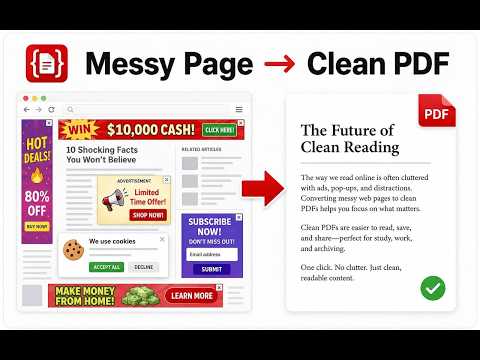
Save a website, web page, or article as a clean PDF. No ads, no sidebars, no clutter — just the content you want.
Save any web page, website article, or blog post as a clean, readable PDF. No ads, no sidebars, no subscription pop-ups. Article to PDF pulls the main content out of a page and shows you a preview of what your PDF will look like. If it looks good, hit "Save PDF". You get a properly formatted document with searchable text, working links, and images that don't get cut off by page breaks. 🔍 HOW IT WORKS 1. Open any article, blog post, recipe, or research paper 2. Click the extension icon 3. Check the clean preview right on the page 4. Remove any block you don't want: hover over it and click to delete it from the PDF (undo anytime) 5. Click "Save PDF". Done. 📄 WHAT YOU GET • Just the article: text, headings, and images • Searchable text with clickable links • Smart page breaks: images never split across pages, headings stay with their text • Lazy-loaded images are captured too • Source URL and save date included in the document • Fine-tune your PDF: remove any unwanted block from the preview before saving 🔒 YOUR DATA STAYS YOURS Everything runs in your browser. Nothing is uploaded anywhere, ever. No account, no tracking. 🌍 SPEAKS YOUR LANGUAGE The extension is available in multiple languages and picks the right one automatically. WORKS GREAT ON News sites (NYT, BBC, The Guardian), Medium, Substack, blogs, tutorials, recipes, and research papers. Whether it's a news site, a documentation page, or a long-form website article — if there's readable content on the web page, we can turn it into a PDF. FREE & PRO The free version gives you full extraction and PDF export for single-page articles. Pro adds multi-page articles. Quick Save — one-click saving that skips the preview — is coming soon to Pro. Used by students, researchers, journalists, teachers, and anyone who reads offline or hates wasting paper. Free during launch: right now every feature is unlocked for everyone, multi-page articles included. When the launch period ends, Pro will be $4.99/month, $19.99/year (with a 3-day free trial), or $39.99 once. Purchases are made on our website, not in the store. Found a site that doesn't extract well? Tell us in a review. We read every single one and fix the sites people report.
0 out of 5No ratings
Details
- Version1.2.4
- UpdatedSeptember 18, 2026
- FeaturesOffers in-app purchases
- Size98.46KiB
- Languages14 languages
- DeveloperWebsite
Email
support@article-to-pdf.com - Non-traderThis developer has not identified itself as a trader. For consumers in the European Union, please note that consumer rights do not apply to contracts between you and this developer.
Privacy

This developer declares that your data is
- Not being sold to third parties, outside of the approved use cases
- Not being used or transferred for purposes that are unrelated to the item's core functionality
- Not being used or transferred to determine creditworthiness or for lending purposes