


Overview
Convert your artwork to GIF format on Twitter/X to prevent AI editing.
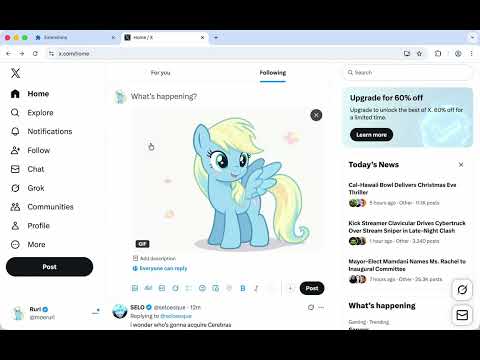
Protect your artwork on Twitter/X from AI editing tools by converting static images to GIF or video format before posting. When you upload artwork as a regular image file to Twitter/X, AI-powered editing tools can easily modify or manipulate your work. This extension converts your images to animated formats that these tools cannot process, helping protect your original artwork. Features: • Convert PNG/JPG images to GIF or video format • Works directly in Twitter/X's post composer • Choose between GIF (15MB limit) or Video (512MB limit) format • GIF: Maximum 2048x2048 resolution, wide compatibility • Video: Better compression, millions of colors, higher quality • Simple one-click conversion process • No registration or account required How to Use: 1. Click the extension icon while composing a post on Twitter/X 2. Select your artwork image (PNG/JPG) 3. The extension converts it to your chosen format 4. Post normally - your art is now protected Both formats create a short loop from your static image, making them incompatible with AI editing tools while still displaying your artwork clearly. Privacy: All conversions happen locally in your browser. Your images are never uploaded to external servers.
5 out of 51 rating
Details
- Version0.2.5
- UpdatedMay 10, 2026
- Size178KiB
- LanguagesEnglish
- DeveloperWebsite
Email
rxliuli@gmail.com - Non-traderThis developer has not identified itself as a trader. For consumers in the European Union, please note that consumer rights do not apply to contracts between you and this developer.
Privacy

This developer declares that your data is
- Not being sold to third parties, outside of the approved use cases
- Not being used or transferred for purposes that are unrelated to the item's core functionality
- Not being used or transferred to determine creditworthiness or for lending purposes
Support
For help with questions, suggestions, or problems, please open this page on your desktop browser