


Overview
Create stunning device mockups and frame screenshots and your images instantly in batches.
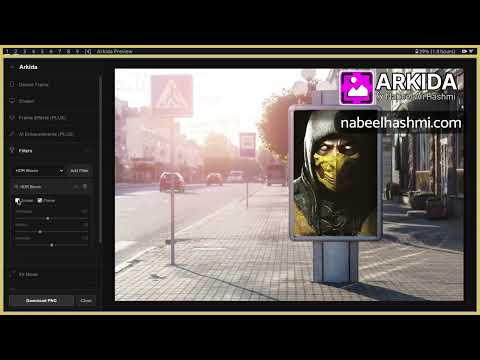
ARKIDA: FREE INSTANT MOCKUPS & PRODUCT SHOTS Arkida is the ultimate solution to turn your screenshots and images into stunning professional product shots and realistic scene mockups. It goes far beyond basic frames with powerful 4-point perspective warping, scene occlusion, AI enhancements and batch processing. Most tools only place your image inside flat frames. Arkida integrates your work into real-world scenes with depth, realism, and precision. 🎯 PERFECT FOR * App Store and Play Store screenshots * Website and SaaS product presentations * Social media and marketing content * Product listings and e-commerce visuals * Personal portfolios and pitch decks 🧩 KEY FEATURES * Built-in SVG frame library for phones, laptops, browsers, and OS windows * 3D rotation engine for realistic X and Y axis tilting * Manual pan, zoom, and crop controls * High-resolution export in PNG, JPG, and WebP * Fully browser-based workflow with no setup required * Privacy first, all processing happens locally on your device ✨ 4-POINT PERSPECTIVE WARPING Map screenshots onto tilted screens, angled monitors, billboards, or any surface. The homography engine keeps everything sharp and properly aligned at any angle. 👁️ SCENE OCCLUSION Place your screenshots behind objects in the photo. Whether it is a hand, a person, or any foreground element, Arkida makes the composition look natural and real. 🤖 AI-ASSISTED DETECTION & CREATION Automatically detect screen boundaries or generate SVG frames using AI prompts. Fine tune with pixel-level precision using zoom and manual controls. 🎨 ADVANCED VISUAL EFFECTS (PLUS) * AI Enhacements: Add glow, glare, and environmental reflections * Stackable Filters: Apply layered artistic effects * Shadow and overlay layers for depth and realism * Expanded frame library for quick reuse 🌐 ONLINE FRAME REPOSITORIES Connect external frame sources and community libraries. Instantly expand your mockup collection beyond the default assets. 🖼️ STOCK IMAGE INTEGRATION (PLUS) Search and import visuals directly from Unsplash, Pexels, and Pixabay inside the editor. ⚡ INSTANT BATCH PROCESSING (PLUS) Upload multiple images or capture all open tabs in one click. Apply frames in bulk and export everything as a single organized ZIP file. 🔒 PRIVACY FIRST: ALL LOCAL, ALL SECURE Everything runs locally in your browser. No cloud uploads, no accounts, and no data leaving your device. 💸 MASSIVE LAUNCH OFFER * 83% off during launch * $1.99/month or $19.99/year Elevate your presentation. Turn ordinary screenshots into premium, portfolio-ready visuals in seconds. Arkida Crafted by Nabeel Ali Hashmi https://nabeelhashmi.com
5 out of 52 ratings
Details
- Version1.9.2
- UpdatedMay 25, 2026
- FeaturesOffers in-app purchases
- Size457KiB
- LanguagesEnglish (United States)
- DeveloperNabeel AliWebsite
MUHALLAH MURAD SHAH HOUSE NO.441 JA KOT SULTAN TEHSIL AND DISTT LAYYAH 31200 PKEmail
mail2nabeelali@gmail.comPhone
+92 308 2264458 - TraderThis developer has identified itself as a trader per the definition from the European Union and committed to only offer products or services that comply with EU laws.
Privacy

This developer declares that your data is
- Not being sold to third parties, outside of the approved use cases
- Not being used or transferred for purposes that are unrelated to the item's core functionality
- Not being used or transferred to determine creditworthiness or for lending purposes
Support
For help with questions, suggestions, or problems, please open this page on your desktop browser