


Overview
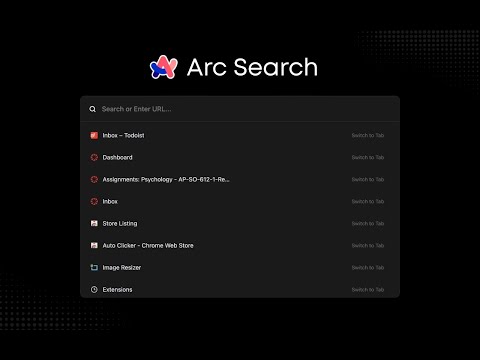
Replaces the generic new tab page with a search engine similar to Arc.
Looking for Arc's stunning command bar to use in Chrome? Download Arc Search today. How to use Arc Search? Step 1: Install the extension Install Arc Search from the Chrome Web Store Step 2: Navigate to extension keyboard shortcuts Go to chrome://extensions/shortcuts in your browser Step 3: Edit keyboard shortcut Edit the "Show search overlay" extension to your desired shortcut (default is Cmd/Ctrl + T) Step 4: Enjoy! Use a strikingly similar search engine to Arc's beloved command bar. Key features: • Simple tab switcher with all open tabs • Indexes through all search history for quick, reliable results • Automatically recognizes URLs and navigates directly, or searches for queries • One-click shortcuts to ChatGPT and Perplexity with your search query
4.1 out of 57 ratings
Details
- Version1.1
- UpdatedSeptember 25, 2026
- Offered bysp.projects.dev
- Size93.2KiB
- LanguagesEnglish
- Developer
Email
sp.projects.dev@gmail.com - Non-traderThis developer has not identified itself as a trader. For consumers in the European Union, please note that consumer rights do not apply to contracts between you and this developer.
Privacy

This developer declares that your data is
- Not being sold to third parties, outside of the approved use cases
- Not being used or transferred for purposes that are unrelated to the item's core functionality
- Not being used or transferred to determine creditworthiness or for lending purposes