


總覽
Instantly run QA with ApSIC Xbench on cloud-based CAT tools
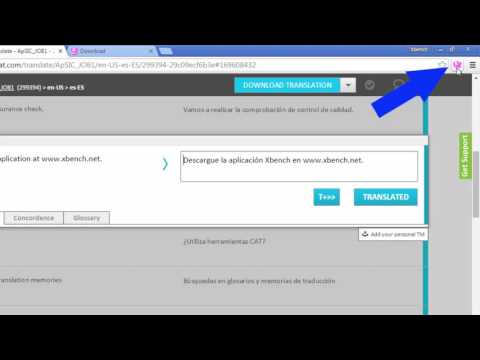
The ApSIC Xbench Chrome Extension will allow you to instantly run QA with ApSIC Xbench 3.0 on your Matecat, Memsource, Transifex, Smartcat, or Crowdin projects with just one click. It is as easy as: For Matecat: ------------------ 1. Open a Matecat job in the Matecat online editor. 2. Click the Xbench icon that appears next to the address bar. 3. Double-click on the downloaded .xbp file to launch Xbench and load the Matecat job. The Matecat project will open in Xbench where you will be able to run QA on your translations. When you find a translation issue in Xbench that you wish to fix, select it, press Ctrl+E and the Matecat editor will open automagically at that segment so that you can edit it! For Memsource: ------------------------ 1. Open the Memsource project or edit a file of the project. 2. Click the Xbench icon that appears next to the address bar. For Transifex: ------------------------ 1. Open the Transifex project and language, or edit/view a resource of the project. 2. Click the Xbench icon that appears next to the address bar. For Smartcat: ------------- 1. Open the Smartcat document or select one or more documents in the workspace. 2. Click the Xbench icon that appears next to the address bar. 3. Double-click on the .xpb file that is downloaded. For Crowdin: ------------- 1. Enter a project and language (or edit a document). 2. Click the Xbench icon that appears next to the address bar. 3. Double-click on the .xpb file that is downloaded. NOTE: Xbench 3.0 build 1350 or later must be installed on your system. You can download Xbench 3.0 from: http://www.xbench.net/index.php/download
3.9 分 (滿分 5 分)7 個評分
詳細資料
隱私權

這位開發者就你的資料做出下列聲明:
- 除經核准的用途外,不會將你的資料販售給第三方
- 不會基於與商品核心功能無關的目的,使用或轉移資料
- 不會為了確認信用度或基於貸款目的,使用或轉移資料
支援
如有疑問或建議,請前往開發人員的支援網站