


Обзор
Instantly run QA with ApSIC Xbench on cloud-based CAT tools
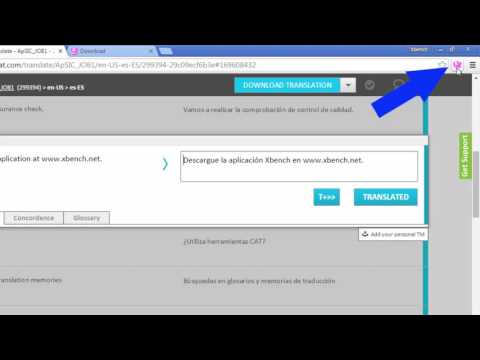
The ApSIC Xbench Chrome Extension will allow you to instantly run QA with ApSIC Xbench 3.0 on your Matecat, Memsource, Transifex, Smartcat, or Crowdin projects with just one click. It is as easy as: For Matecat: ------------------ 1. Open a Matecat job in the Matecat online editor. 2. Click the Xbench icon that appears next to the address bar. 3. Double-click on the downloaded .xbp file to launch Xbench and load the Matecat job. The Matecat project will open in Xbench where you will be able to run QA on your translations. When you find a translation issue in Xbench that you wish to fix, select it, press Ctrl+E and the Matecat editor will open automagically at that segment so that you can edit it! For Memsource: ------------------------ 1. Open the Memsource project or edit a file of the project. 2. Click the Xbench icon that appears next to the address bar. For Transifex: ------------------------ 1. Open the Transifex project and language, or edit/view a resource of the project. 2. Click the Xbench icon that appears next to the address bar. For Smartcat: ------------- 1. Open the Smartcat document or select one or more documents in the workspace. 2. Click the Xbench icon that appears next to the address bar. 3. Double-click on the .xpb file that is downloaded. For Crowdin: ------------- 1. Enter a project and language (or edit a document). 2. Click the Xbench icon that appears next to the address bar. 3. Double-click on the .xpb file that is downloaded. NOTE: Xbench 3.0 build 1350 or later must be installed on your system. You can download Xbench 3.0 from: http://www.xbench.net/index.php/download
3,9 из 57 оценок
Подробности
- Версия1.0.30
- Обновлено17 июля 2025 г.
- Размер24.97KiB
- ЯзыкиEnglish
- РазработчикJose Condal OrriesСайт
Menarguens, 7 Collbató, Barcelona 08293 ESЭлектронная почта
dev.inbox@xbench.netТелефон
+34 670 47 50 35 - ПродавецЭтот разработчик заявил, что является продавцом согласно определению Европейского Союза, и взял на себя обязательство предлагать только товары и услуги, соответствующие законодательству ЕС.
Конфиденциальность

Этот разработчик утверждает, что ваши данные:
- Не продаются третьим лицам, за исключением разрешенных вариантов использования
- Не используются и не передаются в целях, не связанных с работой основных функций продукта
- Не используются и не передаются для определения платежеспособности или в целях кредитования
Поддержка
Сообщить об ошибках в работе приложения, задать вопрос или поделиться идеями можно на сайте разработчика.