


Visão geral
Instantly run QA with ApSIC Xbench on cloud-based CAT tools
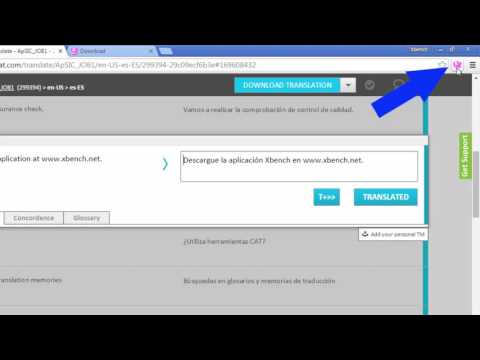
The ApSIC Xbench Chrome Extension will allow you to instantly run QA with ApSIC Xbench 3.0 on your Matecat, Memsource, Transifex, Smartcat, or Crowdin projects with just one click. It is as easy as: For Matecat: ------------------ 1. Open a Matecat job in the Matecat online editor. 2. Click the Xbench icon that appears next to the address bar. 3. Double-click on the downloaded .xbp file to launch Xbench and load the Matecat job. The Matecat project will open in Xbench where you will be able to run QA on your translations. When you find a translation issue in Xbench that you wish to fix, select it, press Ctrl+E and the Matecat editor will open automagically at that segment so that you can edit it! For Memsource: ------------------------ 1. Open the Memsource project or edit a file of the project. 2. Click the Xbench icon that appears next to the address bar. For Transifex: ------------------------ 1. Open the Transifex project and language, or edit/view a resource of the project. 2. Click the Xbench icon that appears next to the address bar. For Smartcat: ------------- 1. Open the Smartcat document or select one or more documents in the workspace. 2. Click the Xbench icon that appears next to the address bar. 3. Double-click on the .xpb file that is downloaded. For Crowdin: ------------- 1. Enter a project and language (or edit a document). 2. Click the Xbench icon that appears next to the address bar. 3. Double-click on the .xpb file that is downloaded. NOTE: Xbench 3.0 build 1350 or later must be installed on your system. You can download Xbench 3.0 from: http://www.xbench.net/index.php/download
3,9 de 57 notas
Detalhes
- Versão1.0.30
- Atualização17 de julho de 2025
- Tamanho24.97KiB
- IdiomasEnglish
- DesenvolvedorJose Condal OrriesWebsite
Menarguens, 7 Collbató, Barcelona 08293 ESE-mail
dev.inbox@xbench.netTelefone
+34 670 47 50 35 - NegocianteEste desenvolvedor se identificou como um comerciante de acordo com a definição da União Europeia e se comprometeu a oferecer somente produtos ou serviços que obedecem à legislação da UE.
Privacidade

O desenvolvedor declara que seus dados
- Não são vendidos a terceiros, exceto nos casos de uso aprovados
- Não são usados ou transferidos para fins não relacionados à função principal do item
- Não são usados ou transferidos para informações de crédito ou empréstimo
Suporte
Para receber ajuda com perguntas, sugestões ou problemas, acesse o site de suporte do desenvolvedor.