


Descripción general
Instantly run QA with ApSIC Xbench on cloud-based CAT tools
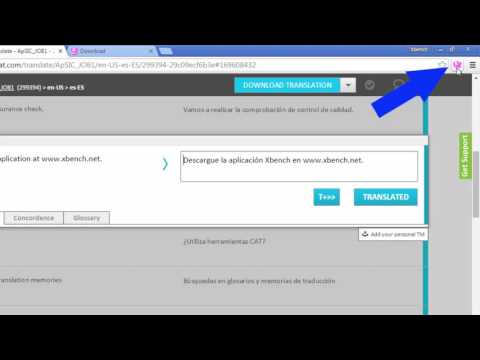
The ApSIC Xbench Chrome Extension will allow you to instantly run QA with ApSIC Xbench 3.0 on your Matecat, Memsource, Transifex, Smartcat, or Crowdin projects with just one click. It is as easy as: For Matecat: ------------------ 1. Open a Matecat job in the Matecat online editor. 2. Click the Xbench icon that appears next to the address bar. 3. Double-click on the downloaded .xbp file to launch Xbench and load the Matecat job. The Matecat project will open in Xbench where you will be able to run QA on your translations. When you find a translation issue in Xbench that you wish to fix, select it, press Ctrl+E and the Matecat editor will open automagically at that segment so that you can edit it! For Memsource: ------------------------ 1. Open the Memsource project or edit a file of the project. 2. Click the Xbench icon that appears next to the address bar. For Transifex: ------------------------ 1. Open the Transifex project and language, or edit/view a resource of the project. 2. Click the Xbench icon that appears next to the address bar. For Smartcat: ------------- 1. Open the Smartcat document or select one or more documents in the workspace. 2. Click the Xbench icon that appears next to the address bar. 3. Double-click on the .xpb file that is downloaded. For Crowdin: ------------- 1. Enter a project and language (or edit a document). 2. Click the Xbench icon that appears next to the address bar. 3. Double-click on the .xpb file that is downloaded. NOTE: Xbench 3.0 build 1350 or later must be installed on your system. You can download Xbench 3.0 from: http://www.xbench.net/index.php/download
3,9 de 57 valoraciones
Detalles
- Versión1.0.30
- Actualizado17 de julio de 2025
- Tamaño24.97KiB
- IdiomasEnglish
- DesarrolladorJose Condal OrriesSitio web
Menarguens, 7 Collbató, Barcelona 08293 ESCorreo electrónico
dev.inbox@xbench.netTeléfono
+34 670 47 50 35 - OperadorEste desarrollador se ha identificado como operador según la definición de la Unión Europea y se ha comprometido a ofrecer solo productos o servicios que cumplan las leyes de la UE.
Privacidad

Este desarrollador declara que tus datos:
- No se venden a terceros, excepto en los casos de uso aprobados
- No se usan ni se transfieren para fines no relacionados con la función principal del elemento.
- No se usan ni se transfieren para determinar la situación crediticia ni para ofrecer préstamos.
Ayuda
Si tienes alguna pregunta, sugerencia o problema, visita el sitio de asistencia del desarrollador.