

AppNexus Creative Insertion Tool (AST Tag)
평점 3개
)

개요
This extension enables dynamic insertion Ads within a webpage using AST API.
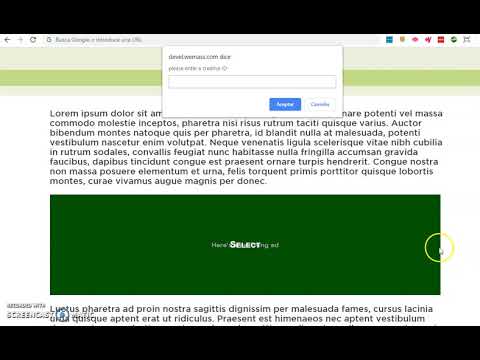
Preface: Original credit to Ben Kahan. https://chrome.google.com/webstore/detail/appnexus-creative-inserti/ailiopjkbojmmdflhbcedndlomhmhkbk he had the idea Sadly his extension is outdated since appnexus discontinued the api he was using. So I updated it using the AST API. Also made it always secure and migrated the code to ES6. Description: This Chrome extension enables dynamic insertion of creative Ads in any HTML element in any page. This can be used for proofs or for debugging your creative in a live environment. How to use: Load the site on which you wish to preview the creative Click the AppNexus Creative Insertion Tool icon to the right of the URL bar Move the mouse cursor over the layer you want to use as placeholder for the creative. It should show a message with the text "SELECT". Click on it, a input prompt should appear. Paste the AppNexus Creative ID and press Enter Enjoy the view.
5점 만점에 5점평점 3개
세부정보
- 버전3.2
- 업데이트됨2020년 1월 26일
- 제공dbl@Wemass
- 크기90.73KiB
- 언어English
- 개발자
이메일
adtech@wemass.com - 비판매자판매자로 식별되지 않은 개발자입니다. 유럽 연합에 거주하는 소비자의 경우, 이 개발자와 체결한 계약에 대해서는 소비자 권리가 적용되지 않을 수 있음을 유의해야 합니다.
개인정보 보호
지원
질문, 제안 또는 문제와 관련하여 도움이 필요하면 데스크톱 브라우저에서 이 페이지를 여세요.