
![Item logo image for Apple TV+ SubStyler: Customize Subtitles & Captions [QVI]](https://lh3.googleusercontent.com/76XcdAYD1Ia2e_zDfe5EdzEZXcUGdsr8qIe_sAds9H8EXdBJ8tw7P15Jbg-lNF31nD89uEbzHCYYF-mgs7MUVjtUbw=s60)
Apple TV+ SubStyler: Customize Subtitles & Captions [QVI]
9 ratings
)![Item media 3 (screenshot) for Apple TV+ SubStyler: Customize Subtitles & Captions [QVI]](data:image/gif;base64,R0lGODlhAQABAIAAAP///////yH5BAEKAAEALAAAAAABAAEAAAICTAEAOw==)
Overview
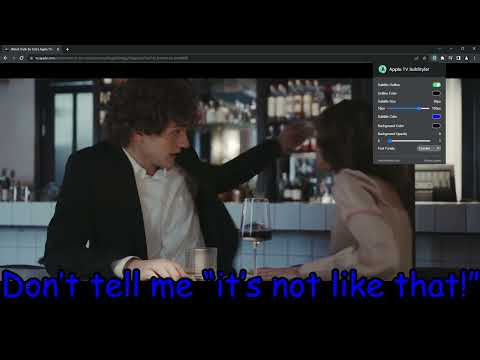
Customize Apple TV+ subtitles & captions: color, size, font, outline, and background. Style text on tv.apple.com your way.
Customize Apple TV+ subtitles and captions to fit your style. Change subtitle color, size, font, outline, and background on tv.apple.com—so captions are easier to read and look the way you want. With Apple TV+ SubStyler you can: - Choose a custom subtitle text color 🌈 - Adjust subtitle and caption text size 📏 - Add a text outline and pick its color 🌈 - Add a subtitle background, set its color, and adjust opacity 🌈 - Choose a font family 🔤 Need more control? Pick colors with the built-in color picker or enter an RGB value for nearly endless subtitle styles. Take Apple TV+ caption and subtitle customization further with Apple TV+ SubStyler. Prefer something simple? Start with basic options like text size and background, then fine-tune the rest. Install the Apple TV+ SubStyler browser extension, open the control panel, and adjust subtitle settings to your preferences. That’s it. ❗**Disclaimer: All product and company names are trademarks or registered trademarks of their respective holders. This extension holds no association or affiliation with them or any third-party companies.**❗ This extension is part of the Quality Viewership Initiative, a collaborative effort to enhance the understanding of audience engagement. It collects anonymous, aggregated viewing insights to support creators and studios in improving the quality of their content. You can stop sharing your information at any time by switching the toggle on the options page.
4.1 out of 59 ratings
Details
- Version1.0.22
- UpdatedAugust 8, 2026
- Offered byStreaming Extensions
- Size168KiB
- Languages55 languages
- DeveloperHideApp
1021 East Lincolnway Cheyenne, WY 82001 USEmail
primepartyapp@gmail.comPhone
+1 802-284-5301 - TraderThis developer has identified itself as a trader per the definition from the European Union and committed to only offer products or services that comply with EU laws.
- D-U-N-S132615120
Privacy

Apple TV+ SubStyler: Customize Subtitles & Captions [QVI] has disclosed the following information regarding the collection and usage of your data. More detailed information can be found in the developer's privacy policy.
Apple TV+ SubStyler: Customize Subtitles & Captions [QVI] handles the following:
This developer declares that your data is
- Not being sold to third parties, outside of the approved use cases
- Not being used or transferred for purposes that are unrelated to the item's core functionality
- Not being used or transferred to determine creditworthiness or for lending purposes
Support
For help with questions, suggestions, or problems, please open this page on your desktop browser