

Slova
3 ratings
)
Overview
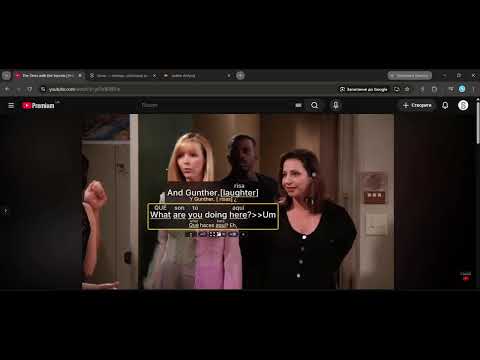
Learn languages with dual subtitles on YouTube and any video site: instant word translation, vocabulary and AI hints.
Slova turns video subtitles into a language-learning tool. Watch videos with subtitles shown over the picture, hover or click any word to see its translation instantly, and save words to your own dictionary. Works not only on YouTube, but also on many other sites with video. Features: • Dual subtitles over the video: original and translation, with the current phrase and word highlighted. You can drag the subtitle window wherever you like. • Instant word translation on click or hover. Select several words to translate a whole phrase. • A personal dictionary stored on your device. Words have statuses: new, learning, known. Videos highlight them in matching colors. • Many languages to choose from, set separately for each role: interface language, subtitle language and translation language are independent. • Different translators: download a translator to your device or connect one through an API. • AI hints that explain a word's meaning in the context of the phrase. This is an optional extra: it needs a powerful computer for a local model, or your own third-party API that you connect. • Dictionary page: browse, search and filter by word status. • Import your own word lists, export, back up and restore at any time. • Sync your dictionary with the Slova mobile app. • Tracking of the time you spend learning. • Free, no sign-up. How to start: 1. Open a video with subtitles. On YouTube, Slova works right away. 2. On other sites, first enable the extension for that site in the Slova window. Then pick the subtitle track the extension has detected. Once you select it in the popup, subtitles appear over the video. 3. Click words, translate them and save them to your dictionary. Privacy: Your dictionary and settings are stored locally in your browser. For translation, a word (and in "with context" mode, the sentence) is sent to the translation service you choose; an on-device translator sends nothing. If you connect an external API for AI hints or translation, data goes to that service. Anonymous statistics are sent only with your consent. Phone sync works directly over your Wi-Fi network, with no cloud.
4.7 out of 53 ratings
Details
- Version1.0.13
- UpdatedNovember 27, 2026
- Offered bySobchuk Oleksandr
- Size10.88MiB
- Languages31 languages
- Developer
Email
sasha.sobchuk18@gmail.com - Non-traderThis developer has not identified itself as a trader. For consumers in the European Union, please note that consumer rights do not apply to contracts between you and this developer.
Privacy

Slova has disclosed the following information regarding the collection and usage of your data. More detailed information can be found in the developer's privacy policy.
Slova handles the following:
This developer declares that your data is
- Not being sold to third parties, outside of the approved use cases
- Not being used or transferred for purposes that are unrelated to the item's core functionality
- Not being used or transferred to determine creditworthiness or for lending purposes