

ApexDevNotes
5 ratings
)
Overview
Developer sidebar for Salesforce: Apex notes, JSON, Custom Labels, Metadata, CMDT, Test Coverage & more.
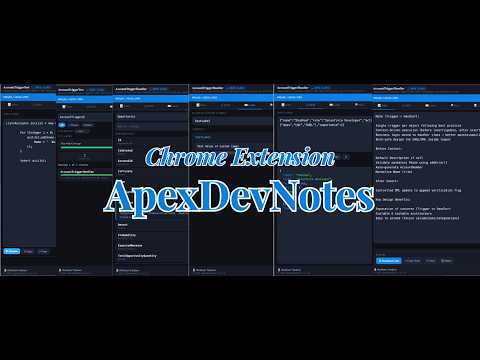
ApexDevNotes — The Ultimate Developer Sidebar for Salesforce Built by a Salesforce developer, for Salesforce developers. ApexDevNotes is a powerful, context-aware Chrome Extension that transforms your Salesforce Developer Console experience — and follows you out onto Object Manager, Setup, and every record page too. Instead of juggling sticky notes, Notepad files, and browser tabs while working on Apex code or configuring an org, you get a sleek intelligent sidebar that lives right inside Salesforce — always at hand, never in the way. The Notes sidebar activates automatically when you open a supported file (Apex Class, Trigger, Visualforce Page or Component) and disappears when you switch away. The rest of the toolkit — JSON, Labels, Meta, Coverage, CMDT, Where, Perms, Settings, and the whole Object Manager module — is available anywhere in Salesforce, one click away. Every tool runs locally inside your browser, with API calls going only to your own Salesforce org. ━━━━━━━━━━━━━━━━━━━━━━ FEATURE 1 — PER-FILE APEX NOTES ━━━━━━━━━━━━━━━━━━━━━━ Every Apex Class, Trigger, VF Page and Component gets its own dedicated note. ✦ Auto-saves as you type — no save button needed. Kicks in 650ms after your last keystroke. ✦ Scoped per file AND per org — sandbox notes are completely separate from production. ✦ Loads instantly on tab switch — open InvoiceTrigger and its notes appear immediately. ✦ Persistent across sessions — close the browser, restart, come back. Notes are waiting. ✦ Download Code — export the full source of any open class or trigger as a .cls or .trigger file. ✦ Export/Import — back up all notes for an org as JSON and restore them on any machine. ━━━━━━━━━━━━━━━━━━━━━━ {} FEATURE 2 — JSON BEAUTIFIER ━━━━━━━━━━━━━━━━━━━━━━ Stop pasting JSON into random online formatters. Works entirely in-browser — no data leaves your machine. ✦ Format — paste any minified JSON and get clean, indented output with syntax highlighting. ✦ Minify — collapse to a single compact line for API calls or Apex string literals. ✦ Validate — get the exact error and character position for invalid JSON. ✦ Copy output with one click. Ctrl+Enter to format instantly. Perfect for Salesforce API responses, Connected App config, Platform Event payloads, and integration debugging. ━━━━━━━━━━━━━━━━━━━━━━ FEATURE 3 — CUSTOM LABELS EXPLORER ━━━━━━━━━━━━━━━━━━━━━━ Search, view and edit Custom Labels without leaving the Developer Console. ✦ Partial name search — type "Error" and find all labels containing that string. ✦ Each result card shows: API Name, Master Label, full value, language, category and record ID. ✦ One-click copy — copy API name (for Apex code) or the full value separately. ✦ Inline edit and save — click ✏, edit the value directly, click Save. Updates via Tooling API immediately. No Setup navigation, no page refresh. ━━━━━━━━━━━━━━━━━━━━━━ FEATURE 4 — OBJECT METADATA EXPLORER ━━━━━━━━━━━━━━━━━━━━━━ Field API names, data types and picklist values for any object — in under a second. ✦ Type any object — standard, custom, external, big object. Every field shows API Name (click to copy), Label, Data Type badge, and Required status. ✦ Picklist values shown as chips directly on the field row. ✦ Live search, a required-only filter for building insert statements, and a 5-minute cache so switching tabs doesn't trigger a redundant API call. ━━━━━━━━━━━━━━━━━━━━━━ FEATURE 5 — APEX TEST COVERAGE DASHBOARD ━━━━━━━━━━━━━━━━━━━━━━ Real-time org-wide Apex test coverage — smarter and faster than the Developer Console view. ✦ Org-wide bar — overall coverage % at a glance: green ≥75%, amber 50–74%, red below 50%. ✦ Stats grid — passed, failed, and total class counts as metric cards. ✦ Per-class breakdown — every class listed with coverage bar, percentage, covered/uncovered lines. ✦ Test classes auto-excluded — smart name detection catches AccountTest / Test_Account without false-flagging real classes like Contest or Testimonial. ✦ Filter by Passed/Failed, sort by coverage or name, set a coverage threshold, and live-search by class name. ✦ Export to Excel — colour-coded Pass/Fail and coverage %, Class vs Trigger type, lines-remaining-to-75%, plus a Summary sheet with org-wide weighted coverage and a full distribution breakdown. ✦ Auto-loads on first tab open. Refresh button fetches latest results after running tests. ━━━━━━━━━━━━━━━━━━━━━━ FEATURE 6 — CUSTOM METADATA EXPLORER ━━━━━━━━━━━━━━━━━━━━━━ Inspect Custom Metadata Type records directly — no SOQL, no Setup navigation. ✦ Type any __mdt name or click ⋯ to browse all types in your org with autocomplete. ✦ Dynamic schema discovery via describe API — works for every CMDT, nothing hardcoded. ✦ Each record expands to a clean table: Field Label, API Name (click to copy), Value. Booleans colour-coded, empty fields hidden. ✦ Live search, sort by Label or API Name, 5-minute cache, read-only for safety. ━━━━━━━━━━━━━━━━━━━━━━ FEATURE 7 — FIELD USAGE FINDER (WHERE) ━━━━━━━━━━━━━━━━━━━━━━ Find every field on an object in seconds, with everything you need to reference it correctly. ✦ Type an object name and get every field on it instantly — standard and custom. ✦ Custom fields flagged separately, with external-link and copy-to-clipboard actions on every row. ✦ Live search narrows the list as you type — no more scrolling the native Fields & Relationships table hunting for one field. ✦ Answers "does this field even exist, and what's its exact API name" without leaving the page you're on. ━━━━━━━━━━━━━━━━━━━━━━ FEATURE 8 — FIELD-LEVEL SECURITY LOOKUP (PERMS) ━━━━━━━━━━━━━━━━━━━━━━ Check field-level security for any profile without opening five different Setup pages. ✦ Pick a profile and instantly see Read/Edit access badges for every field permission on the object. ✦ Handles orgs with 1,000+ field permissions per profile without slowing down. ✦ Stop guessing why a field "isn't showing up" for a user — see the actual FLS grant in one place. ━━━━━━━━━━━━━━━━━━━━━━ FEATURE 9 — OBJECT MANAGER SEARCH & FIELD INSIGHTS ━━━━━━━━━━━━━━━━━━━━━━ ApexDevNotes doesn't just live in the Developer Console — it upgrades Setup itself. ✦ Object Manager home gets an instant, org-wide search bar — find any object by label or API name in one keystroke, not a paginated scroll through 200+ objects. ✦ Every object's native Fields & Relationships table gets its own search bar — filter by label, API name, data type, or just type "required" / "unique" to instantly isolate every field flagged that way. ✦ Four extra columns injected directly into the native table, right where you'd expect them: Created, Modified (who + exact date/time), Required, and Unique — no more opening each field individually to check. ✦ Everything renders inline in Salesforce's own native table — no popups, no separate page, styled to match Salesforce's own UI. ━━━━━━━━━━━━━━━━━━━━━━ FEATURE 10 — ONE-CLICK SETUP NAVIGATOR ━━━━━━━━━━━━━━━━━━━━━━ A floating quick-nav launcher on every Salesforce page — record pages, Object Manager, Setup, Home, list views — Setup, without the click-through maze. ✦ One click to jump straight to Page Layout, Lightning Record Page, Fields & Relationships, Apex Triggers, Flows on this Object, Validation Rules, Record Types, Buttons/Links & Actions — automatically scoped to whatever object you're currently viewing, whether that's a record page or that object's own Setup page. ✦ Org-level shortcuts everywhere else: Setup Home, Profiles, Users, Inbound/Outbound Change Sets, Permission Sets, Permission Set Groups, Debug Logs, Deployment Status, Login History, and the Developer Console. ✦ Neatly categorized — Object Setup, Org Setup, Developer, and your own Custom Links each get their own collapsible section. Drag a whole category to reorder it, or collapse the ones you rarely use. ✦ 19 built-in shortcuts, each with its own icon — choose exactly which ones you want, and drag to reorder, in Settings ▸ Shortcuts. ✦ "Flows on this Object" expands inline to show every record-triggered flow on that object without navigating away at all — scrollable, so an object with a dozen flows doesn't blow out the whole menu. ━━━━━━━━━━━━━━━━━━━━━━ FEATURE 11 — CUSTOM LINKS ━━━━━━━━━━━━━━━━━━━━━━ The Setup Navigator isn't limited to what ships in the box — add your own one-click shortcuts right alongside the built-in ones. ✦ Settings ▸ Shortcuts ▸ Custom Links — give it a label and a URL, hit Add, done. ✦ Shows up in the launcher immediately, in its own "Custom Links" section, marked with a small link badge so it's obviously yours at a glance. ✦ Built for anything: a recurring standup link, a Confluence page, a status dashboard, a shared doc — whatever you open ten times a day. ✦ Remove any time with one click. No limit on how many you add. ━━━━━━━━━━━━━━━━━━━━━━ FEATURE 12 — EXPORT METADATA TO EXCEL ━━━━━━━━━━━━━━━━━━━━━━ Turn any object's field metadata into a real spreadsheet — for documentation, audits, or data migration — in one click. ✦ One click from any object's Setup page — no separate tool, no manual describe-call scripting. ✦ 9 built-in presets for common jobs: Field Usage, Documentation, Data Migration, Formula Audit, Picklist Audit, Relationship Map, Security Audit, Integration Map, and Full Export. ✦ Full control when you need it: filter by Custom/Standard/Formula/Managed, editability, namespace, documentation status, or exclude fields by name pattern. ✦ Pick exactly which columns you want — organised into Core, Identity, Values & Logic, and Relationships groups — from field label and API name to controlling fields and picklist values. ✦ Downloads a properly formatted .xlsx, ready to hand to a business analyst, an auditor, or your next migration project. ━━━━━━━━━━━━━━━━━━━━━━ FEATURE 13 — SESSION ID COPY ━━━━━━━━━━━━━━━━━━━━━━ The session strip sits below the header, visible across all tabs. ✦ Copy SID — copies the full session ID (OrgId!Token) for use as Authorization: Bearer in Postman, curl, or any API client. ✦ Copy Frontdoor URL — copies the complete frontdoor.jsp?sid=... URL. Paste in any browser to log into the org instantly without entering credentials. The session ID is read from the Salesforce sid HttpOnly cookie via the background service worker. Never stored, never logged — used only at the moment you click Copy. ━━━━━━━━━━━━━━━━━━━━━━ FEATURE 14 — SETTINGS & PERSONALISATION ━━━━━━━━━━━━━━━━━━━━━━ ✦ Themes — Light, Dark, SF Classic, Midnight, Forest, Rose. Auto follows system. ✦ Accent colour — 8 presets or any custom hex via colour picker. ✦ Transparency — 50% to 100% opacity. ✦ Font size — 10px to 16px for the notes editor. ✦ Sidebar width — drag the left edge freely, or set precisely in Settings. ✦ Animation speed — Slow, Normal, Fast, or None. ✦ Auto-save delay — 200ms to 2000ms. ✦ Auto-open — open sidebar automatically when a supported file is detected. ✦ Compact mode — denser layout for smaller screens. ✦ Keyboard shortcut — Alt+Shift+N to toggle. Customise at chrome://extensions/shortcuts. ✦ Shortcuts — choose which of the 19 built-in Setup Navigator buttons appear, drag to reorder, and manage your Custom Links, all from one categorized list. ✦ Developer Settings (password-protected) — enable or disable console logs for debugging. ━━━━━━━━━━━━━━━━━━━━━━ PRIVACY ━━━━━━━━━━━━━━━━━━━━━━ ✦ No data collection — zero analytics, telemetry, or personal information collected. ✦ No external servers — no infrastructure to breach. ✦ Local-only storage — notes and settings live in chrome.storage.local on your own device. ✦ API calls stay in your org — every call goes directly to your Salesforce org. No proxies. ✦ Inactive on non-Salesforce pages — completely dormant everywhere else. ━━━━━━━━━━━━━━━━━━━━━━ MULTI-ORG & CONTEXT-AWARE ━━━━━━━━━━━━━━━━━━━━━━ ✦ Multi-org — notes are namespaced by org hostname. Sandbox and production always separate. ✦ Context-aware — the Notes toggle appears for supported file types: .cls, .apxc, .trigger, .apxt, .page, .component, .resource. Hidden entirely on Logs, Tests, and blank panels. The rest of the toolkit — JSON, Labels, Meta, Coverage, CMDT, Where, Perms, Settings, Object Manager search, and the Setup Navigator — works across Salesforce generally, not just inside the Developer Console. ✦ Unsaved change handling — toggle stays visible even when a file has unsaved modifications. ✦ Draggable tab — drag the toggle to any vertical position on the screen. Position saved. ✦ Pin mode — keep the sidebar open permanently while working. ✦ Built on Manifest V3 with a Shadow DOM UI — zero CSS conflicts with Salesforce Lightning, no measurable performance impact. ━━━━━━━━━━━━━━━━━━━━━━ WHY DEVELOPERS LOVE APEXDEVNOTES ━━━━━━━━━━━━━━━━━━━━━━ "I need to remember what this batch job does" → Write a note. It's there every time you open that class. "What's the API name of that picklist field on Invoice?" → Object Metadata Explorer. Type the object, find the field, click to copy. Done in 3 seconds. "The integration team sent me this JSON payload and I can't read it" → JSON Beautifier. Paste, Ctrl+Enter, formatted. "What's our current test coverage before I deploy?" → Coverage Dashboard. Click Refresh, filter to classes below 75%, export to Excel. "What are the field values in our SAP_Config__mdt records?" → Custom Metadata Explorer. Type the type name, every record and field value appears instantly. "Why can't this user see the field — is it FLS or the page layout?" → Perms tab. Pick their profile, see the Read/Edit grant instantly. "I need every field on this object documented for an audit by Friday" → Export Metadata. Pick the Documentation preset, export, done. "I open the same standup link and sprint board every single day" → Add them as Custom Links once. One click from any Salesforce page after that. ━━━━━━━━━━━━━━━━━━━━━━ SUPPORTED FILE TYPES ━━━━━━━━━━━━━━━━━━━━━━ .cls / .apxc → Apex Class .trigger / .apxt → Apex Trigger .page → Visualforce Page .component → Visualforce Component .resource → Static Resource ━━━━━━━━━━━━━━━━━━━━━━ KEYBOARD SHORTCUTS ━━━━━━━━━━━━━━━━━━━━━━ Alt + Shift + N → Toggle sidebar open/closed (customisable) Ctrl + Enter → Format JSON (JSON tab) Enter → Search Custom Labels Enter → Fetch object metadata Enter → Fetch Custom Metadata records Customise the toggle shortcut at chrome://extensions/shortcuts ━━━━━━━━━━━━━━━━━━━━━━ FREQUENTLY ASKED QUESTIONS ━━━━━━━━━━━━━━━━━━━━━━ Q: Does this work with sandboxes and scratch orgs? A: Yes. Notes are automatically separated by hostname — sandbox and production always isolated. Q: What happens to my notes if I uninstall the extension? A: Deleted with all extension data. Export notes as JSON from Settings first if needed. Q: Can I use this across multiple orgs in different browser tabs? A: Yes. Each tab is independent, scoped to its own org hostname. Q: Is there a limit on how many notes or Custom Links I can store? A: Chrome's storage.local has a 10MB limit — plenty for thousands of notes and as many Custom Links as you'll ever use. Q: Does the Object Manager search and Export Metadata work on custom objects too? A: Yes — both work on any object your profile can access, standard or custom. ━━━━━━━━━━━━━━━━━━━━━━ FREE FOREVER ━━━━━━━━━━━━━━━━━━━━━━ ApexDevNotes is completely free — no paid tiers, no subscription, no account required. Install it, use it, share it with your Salesforce team. Built by Shubham Vaishnav — Salesforce Developer. Blog: salesforceforfresher.wordpress.com LinkedIn: linkedin.com/in/theshubhamvsnv
5 out of 55 ratings
Details
- Version2.6.0
- UpdatedAugust 27, 2026
- Offered byShubham Vaishnav
- Size172KiB
- LanguagesEnglish (United States)
- Developer
Email
theshubhamvsnv@gmail.com - Non-traderThis developer has not identified itself as a trader. For consumers in the European Union, please note that consumer rights do not apply to contracts between you and this developer.
Privacy

This developer declares that your data is
- Not being sold to third parties, outside of the approved use cases
- Not being used or transferred for purposes that are unrelated to the item's core functionality
- Not being used or transferred to determine creditworthiness or for lending purposes
Support
For help with questions, suggestions, or problems, visit the developer's support site