

Apex Debugger
Pregled
Debug Salesforce apex code with ease
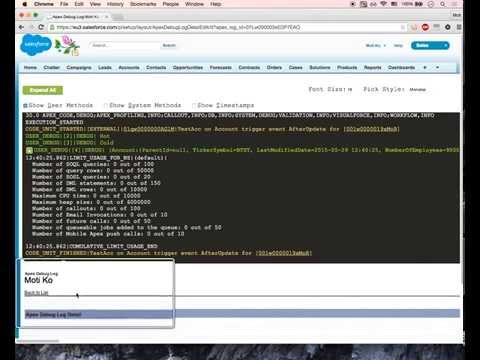
Apex debugging with ease. Improved debug logs for Salesforce. Press Shift+d from any salesforce page to open Logs. Click on extension to configure keyboard shortcuts. IMPORTANT! If your org has "Require HttpOnly attribute" option enabled (in Setup -> Security -> SessionSettings) you need to set session ID variable manually. For this click on the extension icon and fill in the last field. Disabling ""Require HttpOnly attribute" adds security risk and should not be done in production orgs. IMPORTANT2! Manifest 3 support from version 0.8. I do expect some bugs. Please report in GitHub. • Search in logs • Filter logs • Delete all logs • Add current User • Indent structured data such as sObject, List, XML or JSON • Improved view with custom themes • Any Id in logs is a link to respective Object page (Class, Trigger, Validation Rule e.t.c) • Lightning compatible PS If you want to report an issue please use GitHub issues (https://github.com/motiko/sfdc-debug-logs/issues). Or contact me by email. I don't see notifications from Chrome Web Store reviews.
4,2 od 533 ocjene
Pojedinosti
- Verzija0.8.0
- Ažurirano2. prosinca 2024.
- Veličina881KiB
- JeziciEnglish
- Razvojni programerWeb-lokacija
E-pošta
moti.kor@gmail.com - NetrgovacOvaj razvojni programer nije se identificirao kao trgovac. Ako ste potrošač u Europskoj uniji, imajte na umu da se potrošačka prava ne primjenjuju na ugovore između vas i tog razvojnog programera.
Privatnost

Ovaj razvojni programer izjavljuje da se vaši podaci
- ne prodaju se trećim stranama, osim u odobrenim scenarijima upotrebe
- Ne koriste se i ne prenose u svrhe koje nisu povezane s osnovnom funkcijom artikla.
- Ne koriste se i ne prenose radi utvrđivanja kreditne sposobnosti ili davanja zajmova.
Podrška
Za pomoć u vezi s pitanjima, prijedlozima ili problemima otvorite ovu stranicu u računalnom pregledniku