

X Article Importer
1 rating
)
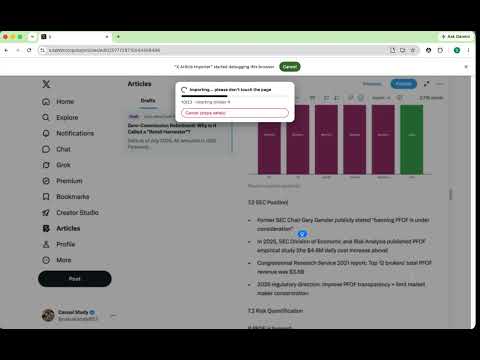
Overview
Import a markdown file (with local images and tables) into the X Articles editor as a draft. Never publishes automatically.
X Article Importer lets you publish a Markdown file to the X (Twitter) Articles editor in one click — no more copy-pasting and re-formatting by hand. Write your article in Markdown, click import, and the extension fills the draft for you: title, headings, bold/italic, links, ordered and unordered lists, blockquotes, dividers, local images, and tables (rendered as clean images). It can also generate a matching 5:2 cover from your title, or you can add your own. ■ What it does • One-click import of a .md file into an X Article draft • Preserves formatting: headings, bold/italic, lists, quotes, links, dividers • Inserts your local images at the correct positions in the article • Renders Markdown tables as images (X Articles has no native table support) • Optional auto-generated cover image from the article title • Resumable: if a run is interrupted, re-running only fills what's missing — nothing is duplicated ■ Draft only — safe by design The extension NEVER publishes automatically. It only fills a draft. You always review and click Publish yourself. ■ Privacy Everything runs locally in your browser. The extension does not collect, transmit, or store any of your data, and talks to no external servers. Your Markdown files and images never leave your computer. ■ Permissions • "debugger" is used only to send trusted clicks and keystrokes to the current X Articles tab (after you click Import) so content can be placed at the correct position in the editor. It is never used to read or monitor your browsing. • Host access is limited to x.com. ■ Requirements X Articles is a Premium feature, so an eligible X account is required to create articles. ■ Note This is an independent, unofficial tool. It is not affiliated with, endorsed by, or sponsored by X Corp. "X" is used only to describe the platform this tool works with.
5 out of 51 rating
Details
- Version0.3.2
- UpdatedSeptember 20, 2026
- Offered bycasual study
- Size238KiB
- LanguagesEnglish
- Developer
Email
reggaeleetcode@gmail.com - Non-traderThis developer has not identified itself as a trader. For consumers in the European Union, please note that consumer rights do not apply to contracts between you and this developer.
Privacy

This developer declares that your data is
- Not being sold to third parties, outside of the approved use cases
- Not being used or transferred for purposes that are unrelated to the item's core functionality
- Not being used or transferred to determine creditworthiness or for lending purposes
Support
For help with questions, suggestions, or problems, visit the developer's support site