


Overview
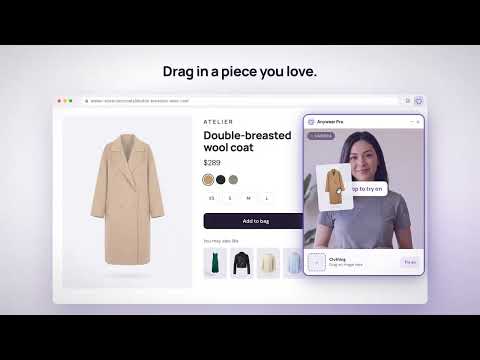
Try clothes on live webcam video. Drag shopping images into your fitting room. Free preview; paid AI time. English and Chinese.
Anywear Pro — Live AI Virtual Try-On Open a live fitting room beside your shopping page. Turn on your camera, drag in an accessible clothing image, and preview an AI interpretation of the outfit while you move. A larger, simpler fitting window The floating window adapts to your screen and keeps the live preview prominent. Move it, minimize it, use full-screen viewing or continue in the standalone web studio. Protected browser pages cannot host the floating window. Add a garment and see what is selected Drag a clothing image into the fitting window, upload an image, or right-click an accessible image and choose Try on with Anywear Pro. A thumbnail confirms the selected garment. You can drop another image to change outfits during the same live session. Some websites restrict image access; use a clothing image you have permission to upload instead. Video references are not supported. Replay your session When you start AI try-on, the extension automatically records the fitting-window video temporarily on your device, without sound or the surrounding shopping page. After the session ends, replay the video, download a copy with the Anywear.pro watermark, or choose to share it with a try-on link. Sharing requires your confirmation in the device’s sharing options. If direct file sharing is unavailable, download the video and copy the link. Recordings are not automatically uploaded. Unsaved recordings are cleared when you close the fitting window, leave its page or start a new recording. Recording availability depends on browser support and device resources. English and Chinese The extension follows your browser language by default. Choose English or Chinese in the fitting window to override it, and your choice is remembered. Clear time controls Installation and the original camera preview are free. AI try-on uses separately purchased time in your browser wallet. Choose 1 minute, 5 minutes or no user-set session limit; available balance and service limits still apply. A new paid session does not start automatically. Ending AI try-on requests a stop, and the original free preview can remain after it stops. Closing the window requests that the paid session stop and releases the camera. Minimizing an active window keeps it running and using time. The interface confirms when stopping is complete. One-time time packs, no subscription Standard packs are 1 minute for US$1.99, 5 minutes for US$4.99, 15 minutes for US$11.99 and 60 minutes for US$39.99. These are total balances usable across sessions, rather than uninterrupted livestream plans. Current offers and free-demo availability are shown on the website. Time starts when the AI model connection is ready, which may precede the first edited frame. Unused reserved whole seconds are returned to the same browser balance after settlement. The checkout confirmation shows the actual price. Camera and privacy Camera video and the selected clothing image are sent to third-party AI services only after you agree to processing and start AI try-on. Microphone capture is off. No personal API key or local server is required. The connected Anywear Pro website provides the camera and AI connection. The extension and website share purchased time in the same browser profile; keep website data to retain wallet access. Changing browsers or devices does not automatically transfer your balance. AI previews can change garment details or appearance. They help explore styling and do not measure size, fabric or physical fit. Use a current desktop browser that permits real-time video. Public video hosting, affiliate commissions and referral payouts are not features of this release. Website: https://anywear.pro/ Privacy: https://anywear.pro/privacy Support: hi@yuzong.ai Operated by EchoSub AI, LLC. Anywear Pro is an independent service and is not affiliated with Decart or its Anywear product.
3.7 out of 53 ratings
Details
- Version0.4.18
- UpdatedNovember 9, 2026
- FeaturesOffers in-app purchases
- Size758KiB
- Languages3 languages
- Developer
- TraderThis developer has identified itself as a trader per the definition from the European Union and committed to only offer products or services that comply with EU laws.
Privacy

Anywear Pro — Live AI Virtual Try-On has disclosed the following information regarding the collection and usage of your data. More detailed information can be found in the developer's privacy policy.
Anywear Pro — Live AI Virtual Try-On handles the following:
This developer declares that your data is
- Not being sold to third parties, outside of the approved use cases
- Not being used or transferred for purposes that are unrelated to the item's core functionality
- Not being used or transferred to determine creditworthiness or for lending purposes
Support
For help with questions, suggestions, or problems, visit the developer's support site