


Overview
Chat with any page using your own AnythingLLM. Summarize and rewrite text, run agents, and save the web to your workspaces.
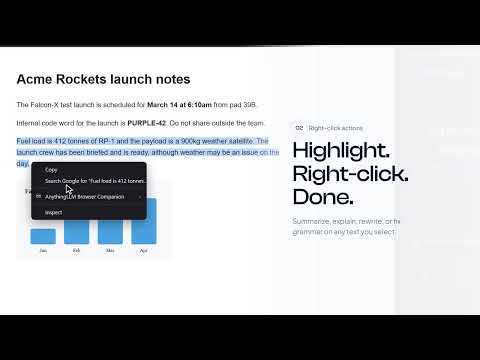
**This extension requires you to have AnythingLLM** Your AnythingLLM agents in your browser. AnythingLLM Browser Companion puts your AnythingLLM workspaces in Chrome's side panel. Ask about the page you're on, bring in other tabs, and act on anything you highlight, all powered by the models, documents, and agents you've already set up in AnythingLLM. Requires AnythingLLM 1.20.0 or newer (Desktop, Docker, or Cloud). Get it free: https://anythingllm.com/download WHAT YOU CAN DO • Chat with any page: the tab you're on is one click away as context • Bring in more tabs: type @ to compare or combine other open pages • Highlight and right-click: Ask, Summarize, Explain, Rewrite, or Fix spelling and grammar • Ask about images: right-click any image and add it to the chat • Attach files: drag, drop, or paste files and images into the chat • Talk instead of type: dictate with the built-in microphone • Run agents: approve tool calls, answer clarifying questions, and get charts and files right in the panel • Pick up where you left off: every chat is saved as a thread in your workspace, ready to continue in AnythingLLM • Save the web: send a selection or a whole page to AnythingLLM, or embed it straight into a workspace GET STARTED 1. Click the toolbar icon (or press Alt+Shift+L) to open the side panel 2. In AnythingLLM, open Settings > Tools > Browser Extension and click Connect, or paste the connection string into the panel 3. Approve the connection and start chatting YOUR AI, YOUR DATA The companion connects only to the AnythingLLM instance you choose. The chats, pages, and files you share go there and nowhere else. OPEN SOURCE MIT licensed and easy to customize or white-label. Extension: https://github.com/Mintplex-Labs/anythingllm-extension AnythingLLM: https://github.com/Mintplex-Labs/anything-llm
4.4 out of 512 ratings
Details
- Version1.20.0
- UpdatedNovember 19, 2026
- Size675KiB
- LanguagesEnglish
- DeveloperWebsite
Email
team@mintplex.xyz - Non-traderThis developer has not identified itself as a trader. For consumers in the European Union, please note that consumer rights do not apply to contracts between you and this developer.
Privacy

This developer declares that your data is
- Not being sold to third parties, outside of the approved use cases
- Not being used or transferred for purposes that are unrelated to the item's core functionality
- Not being used or transferred to determine creditworthiness or for lending purposes
Support
For help with questions, suggestions, or problems, please open this page on your desktop browser