

Anycord - Text-to-Speech Recorder
2 ratings
)
Overview
Record and download text-to-speech audio from ChatGPT and other websites.
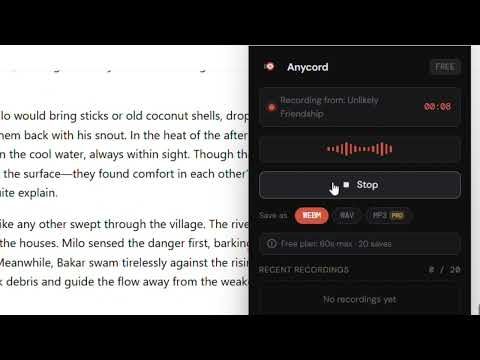
Anycord lets you record and download text-to-speech audio from any website — ChatGPT, Google, ElevenLabs, and more — with one click. FEATURES: - Record TTS audio from any website - Save as WEBM or WAV format - Works with ChatGPT Read Aloud, Google TTS, ElevenLabs, and more - Clean recordings with no static or quality loss - Recording history saved locally - Standalone recorder window — stays open while you browse PRO ($4.99 one-time): - Unlimited recording length (free: 60 seconds) - Unlimited saves (free: 20 recordings) - MP3 export format - No subscription ever HOW TO USE: 1. Click the Anycord icon in your toolbar 2. Start TTS on any website (e.g. ChatGPT Read Aloud) 3. Click Record in the Anycord window 4. Click Stop when done — file saves automatically to Downloads Your recordings never leave your device. No account required.
5 out of 52 ratings
Details
- Version1.0.0
- UpdatedJune 25, 2026
- FeaturesOffers in-app purchases
- Offered byfahmitester
- Size23.37KiB
- LanguagesEnglish (United States)
- Developer
Email
fahmitester@gmail.com - Non-traderThis developer has not identified itself as a trader. For consumers in the European Union, please note that consumer rights do not apply to contracts between you and this developer.
Privacy

This developer declares that your data is
- Not being sold to third parties, outside of the approved use cases
- Not being used or transferred for purposes that are unrelated to the item's core functionality
- Not being used or transferred to determine creditworthiness or for lending purposes