

Any Site Lock - Secure sites and Bad Word, Browser Lock

Overview
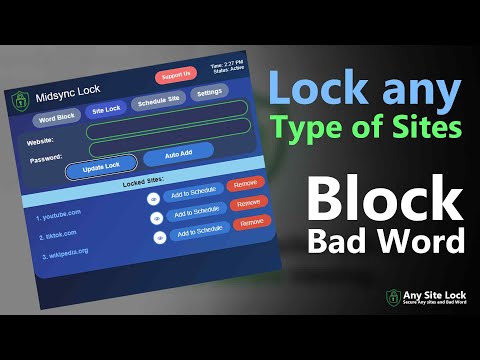
Lock websites with passwords & smart scheduling. Block distractions instantly via right-click. Browser Lock & Extension Lock.
📲New Features Update - Browser Lock - Extension Lock - New Look Design - Community Chat 💻 Site Lock Chrome Extension This extension allows you to lock individual websites. When you visit a locked site, the page will remain hidden until you enter the correct password. Protect individual websites with Site Lock. Assign unique passwords to each site, auto-add sites to your protected list for one-click protection, and block content entirely — the page stays blank until the correct password is entered. Fast, private, and simple to manage. "Site Lock" Lock individual websites with a password before viewing. 📲New Features - Bad Word Block - Hide Locked Page with Cover Image/Video - Lock any website by domain - Lock any website by domain with Schedule time - Lock extension no one can open without password - Password prompt before viewing locked sites - Options page to manage locked sites and passwords Site Lock puts you in full control of what loads in your browser. Features: * Lock individual websites with a password before they can be opened. * Use different passwords for different sites so access can be customized per site or user. * Auto-add sites to your protected list so new or suspicious pages are protected instantly. * Until the correct password is entered, the site displays nothing (a blank/blocked page) — no previews, no content, no trackers. * you click "Cancel" button it will close that also automatically. Easy setup, clear password management, and reliable privacy for shared devices or focused browsing. 🔐 Security Note Passwords are stored using Chrome's sync storage and are not encrypted. Do not use sensitive passwords.
5 out of 51 rating
Details
- Version3.1.0
- UpdatedJanuary 30, 2026
- Size54.67KiB
- LanguagesEnglish (United States)
- DeveloperMD. MAHAFUJUR RAHMANWebsite
B-4, 4th floor, Holding no-970, Hasan Perfect Tower Post Office Road, Middle Badda, Badda Dhaka 1214 BDEmail
nh.mahafuj@gmail.com - Non-traderThis developer has not identified itself as a trader. For consumers in the European Union, please note that consumer rights do not apply to contracts between you and this developer.
Privacy

This developer declares that your data is
- Not being sold to third parties, outside of the approved use cases
- Not being used or transferred for purposes that are unrelated to the item's core functionality
- Not being used or transferred to determine creditworthiness or for lending purposes
Support
For help with questions, suggestions, or problems, please open this page on your desktop browser