

Anki Flashcard Creator

Overview
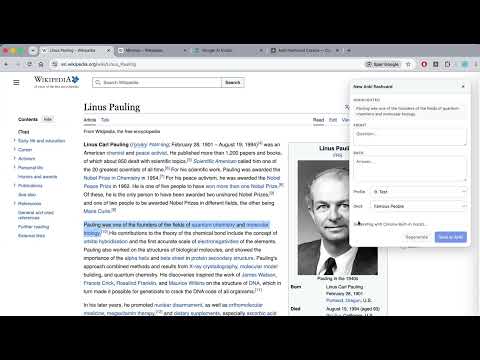
Highlight text on any page and create an AI-suggested Anki flashcard in one click. Saves to your Anki desktop deck.
Turn what you read into what you remember. Anki Flashcard Creator lets you highlight text on any web page — a Substack post, a news article, a Wikipedia entry, a documentation page — and instantly create a high-quality Anki flashcard from it. An AI proposes the question and answer; you can edit it; one click and it lands in your Anki deck. WHY YOU'LL LIKE IT • Frictionless. Highlight → right-click, keyboard shortcut, or floating "+" button → review → save. No copy-paste, no app switching. • Smart deck routing. The AI picks the best-fitting deck from your existing decks. Switching decks (or Anki profiles) is one click. • Source link preserved. Every card's back gets a link back to the article it came from. • Works with the Anki you already use. Cards land in your real Anki desktop install and sync to mobile via AnkiWeb like any other card. • Two AI options. Free Gemini API (cloud, best quality) or fully-local Chrome Built-in (Gemini Nano — unlimited, private). WHAT YOU NEED • Anki desktop with the AnkiConnect add-on (free; the welcome page walks you through it). • Either a free Gemini API key, or Chrome with on-device AI enabled. The first-run welcome page handles setup. The whole thing takes about three minutes. PRIVACY The extension only reads the text you actively highlight when you trigger card creation. It doesn't track browsing, doesn't run analytics, and doesn't contact any servers operated by the extension author. The highlighted text plus the page title/URL are sent to your chosen AI provider (Google Gemini for cloud mode, or your local Chrome for on-device mode). Generated cards go directly to your own Anki desktop client over localhost. Full privacy policy linked from the store listing. KEYBOARD SHORTCUT ⌘⇧A on Mac / Ctrl+Shift+A on Windows/Linux. Rebind at chrome://extensions/shortcuts.
0 out of 5No ratings
Details
- Version1.0.0
- UpdatedJune 6, 2026
- Size1.57MiB
- LanguagesEnglish
- Developer
Email
jesjohannesen@gmail.com - Non-traderThis developer has not identified itself as a trader. For consumers in the European Union, please note that consumer rights do not apply to contracts between you and this developer.
Privacy

Anki Flashcard Creator has disclosed the following information regarding the collection and usage of your data. More detailed information can be found in the developer's privacy policy.
Anki Flashcard Creator handles the following:
This developer declares that your data is
- Not being sold to third parties, outside of the approved use cases
- Not being used or transferred for purposes that are unrelated to the item's core functionality
- Not being used or transferred to determine creditworthiness or for lending purposes