

Flowmator - Bulk Flow AI Prompt Automator
2 ratings
)
Overview
Automate Google Flow AI prompts with verified safe sequence queues, auto-retry, storyboard continuity & bulk batching.
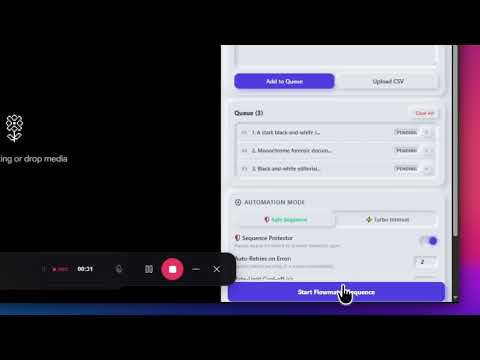
Flowmator is a companion suite built for creators, filmmakers, and digital artists working on Google Flow. It streamlines your prompt generation workflow with intelligent queue management, verified sequence continuity, and automated error recovery. Whether you are producing visual storyboards, sequential character scenes, or cinematic b-roll, Flowmator ensures your prompt sequences run smoothly without manual babysitting. ━━━━━━━━━━━━━━━━━━━━━━━━━━ ✨ KEY FEATURES ━━━━━━━━━━━━━━━━━━━━━━━━━━ 🛡️ Safe Sequence Mode (Verified Generations) • Intelligently monitors canvas rendering states before moving to the next prompt. • Detects generation error tiles automatically and initiates smart cooldown retries. • Sequence Protector pauses the queue on persistent errors to prevent broken narrative scenes. ⚡ Turbo Interval Mode • Pushes continuous prompt injections with customizable randomized delays (min/max seconds). • Ideal for rapid ideation and high-volume background batches. 🎯 Hardware-Level CDP Input • Emulates authentic keyboard keystrokes and button clicks via Chromium DevTools Protocol. • Accurately types into Google Flow's ProseMirror editor and bypasses synthetic event drops. 💾 Local Storyboard Presets • Comes preloaded with cinematic storyboard sequences (Noir, Cyberpunk, and Anime). • Save, export, and manage your custom queues anytime as CSV files. 📥 Auto-Download Manager • Optional toggle to automatically save completed creations directly to your downloads folder with sequential timestamps. 🎨 Tactile Neumorphic Design • Ergonomic light and dark themes designed to fit comfortably in your Chrome side panel alongside your active workspace. ━━━━━━━━━━━━━━━━━━━━━━━━━━ 🚀 HOW TO USE ━━━━━━━━━━━━━━━━━━━━━━━━━━ 1. Open Google Flow (https://flow.google/). 2. Open the Flowmator side panel from your Chrome toolbar. 3. Paste your prompts separated by line breaks or import a CSV. 4. Select your mode (Safe Sequence or Turbo Interval) and click "Start Flowmator Sequence". ━━━━━━━━━━━━━━━━━━━━━━━━━━ 🔒 PRIVACY & TRANSPARENCY ━━━━━━━━━━━━━━━━━━━━━━━━━━ Flowmator runs locally inside your browser. Your prompts, settings, and generated assets remain strictly on your device and are never sent to external servers or third parties.
5 out of 52 ratings
Details
- Version1.0.1
- UpdatedOctober 20, 2026
- Offered bynasirsexpo
- Size41.8KiB
- LanguagesEnglish
- DeveloperMd Nasir Hussain
G-86c Lal Kuan new delhi 110044 Delhi, Delhi 110044 INEmail
nasirhussain76830@gmail.comPhone
+91 76830 74637 - TraderThis developer has identified itself as a trader per the definition from the European Union and committed to only offer products or services that comply with EU laws.
Privacy

This developer declares that your data is
- Not being sold to third parties, outside of the approved use cases
- Not being used or transferred for purposes that are unrelated to the item's core functionality
- Not being used or transferred to determine creditworthiness or for lending purposes
Support
For help with questions, suggestions, or problems, visit the developer's support site