

Anchor Locator

Overview
Build resilient XPath locators from any anchor you pick. Free, no ads, privacy-first. Record to Playwright, Selenium & Cypress.
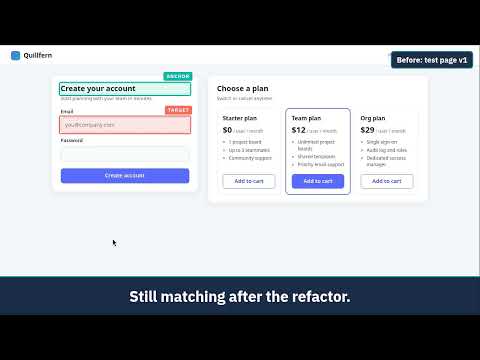
Anchor to what doesn't change. Free: XPath generation, free-select anchor, and all exports. Recorder: 10 free steps (lifetime). Pro unlocks unlimited recording for $8/month or $49 lifetime. Anchor Locator lets QA automation engineers build locators from the element they trust. Pick any stable element on the page as your anchor, and get readable XPath that keeps working when IDs and classes change. THE PROBLEM Locators like //*[@id='input-423'] or /html/body/div[3]/div[2]/input depend on generated attributes or page position. The next build renames the ID, or a UI refactor adds one wrapper div, and tests go red even though the app works fine. HOW IT WORKS 1. Click the element your test needs (the target). 2. Pick any element as the anchor: a field label, a heading, a card title, a column header. The panel also suggests an anchor automatically, and you can accept it or choose your own. 3. Get readable XPath built with XPath axes (following::, preceding::, following-sibling::) and normalize-space(.), for example: //label[normalize-space(.)='Email']/following::input[1] This locator is tied to the visible "Email" label, not to a generated ID, so it keeps matching when IDs and class names are regenerated or a wrapper div is added. TABLES Anchor a cell to its column header and its row key. The "Table (sort-safe)" locator still finds the same cell after the table is re-sorted. RECORDER - Record steps on a page, including assertions (visible, text, value, attribute). - Choose your framework in the Record tab before you start recording. - Export to Playwright (TypeScript), Selenium (Java, Python, C#) and Cypress. - Selenium exports use axes-based XPath. Playwright exports use built-in getBy... locators with an XPath fallback. Cypress exports use CSS selectors and cy.contains, with no plugin to install. - Recorded password values are written as environment-variable placeholders, not as the typed text. FREE AND PRO Free: - Every locator feature, including free-select anchor, auto-suggested anchors, axes-based XPath and sort-safe table locators. - 10 Recorder steps to try it (lifetime, per user), with every Recorder feature and every export. Assertions count toward the 10. - Anything you record stays exportable. Pro (unlimited Recorder steps) is coming soon. PRIVACY Page data never leaves your browser; only license checks go online. Locators and recordings are built and stored in your browser. Activating Pro sends your license key to Lemon Squeezy to verify it. Privacy-first, no ads. Privacy policy: https://kedveneilrabe.github.io/anchor-locator-site/privacy.html WHO IT'S FOR QA automation engineers and SDETs on Playwright, Selenium or Cypress, especially on apps without stable test IDs: third-party SaaS, legacy enterprise apps, and builds with generated IDs and hashed class names. If your app already has stable test IDs everywhere, use them. Anchor Locator is for the places they don't reach. SUPPORT Questions, bugs or refund requests: kedveneilrabe@gmail.com
0 out of 5No ratings
Details
- Version1.0.1
- UpdatedOctober 24, 2026
- Offered bykedveneilrabe
- Size90.68KiB
- LanguagesEnglish
- DeveloperKENT EDVE NEIL TRABALLO RABE
BARANGKA DRIVE, BARANGKA DRIVE UNIT 3 ADELAIDA BUILDING MANDALUYONG CITY, Metro Manila 1550 PHEmail
kedveneilrabe@gmail.comPhone
+63 961 515 7836 - TraderThis developer has identified itself as a trader per the definition from the European Union and committed to only offer products or services that comply with EU laws.
Privacy

Anchor Locator has disclosed the following information regarding the collection and usage of your data. More detailed information can be found in the developer's privacy policy.
Anchor Locator handles the following:
This developer declares that your data is
- Not being sold to third parties, outside of the approved use cases
- Not being used or transferred for purposes that are unrelated to the item's core functionality
- Not being used or transferred to determine creditworthiness or for lending purposes
Support
For help with questions, suggestions, or problems, visit the developer's support site