


Overview
Add links to the analysis paths found in the “Pages and Screens” and “Landing Pages” reports within Google Analytics.
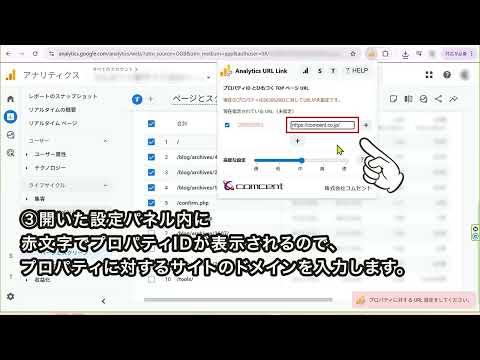
By making it clickable, you can instantly check the site in a separate tab. Enhance your Google Analytics workflow by bridging the gap between page paths and actual site content. By simply hovering over a linked path (URL portion), you can automatically retrieve and display the site title. You can also reverse-look up paths from titles. Supported Reports: Pages and screens Landing page Realtime: Page path and screen class Settings Domain Configuration To set up, navigate to your Google Analytics Property settings and open the Admin menu to retrieve your Property ID (displayed in red at the top). Enter the target domain in the text area to the right of the ID to automatically generate destination URLs. Once configured, these settings will be applied automatically whenever you access the Analytics dashboard. Force Override: By checking the checkbox on the left, you can force links to point to a different site. This is ideal for testing environments or cross-domain verification. Advanced Settings (Performance) The site title retrieval feature accesses your website directly. Please note that if your site has security restrictions or rate limits, retrieval may fail. You can adjust the crawling speed at your own risk: Slow: 5 pages / sec Low: 10 pages / sec Medium: 15 pages / sec High: 25 pages / sec Fast: Unlimited (Process 50 pages at once)
0 out of 5No ratings
Details
- Version0.0.10
- UpdatedJuly 2, 2026
- Size95.98KiB
- Languages2 languages
- DeveloperWebsite
Email
info2@comcent.co.jp - Non-traderThis developer has not identified itself as a trader. For consumers in the European Union, please note that consumer rights do not apply to contracts between you and this developer.
Privacy

This developer declares that your data is
- Not being sold to third parties, outside of the approved use cases
- Not being used or transferred for purposes that are unrelated to the item's core functionality
- Not being used or transferred to determine creditworthiness or for lending purposes