


Overview
Your spatial memory, always open.
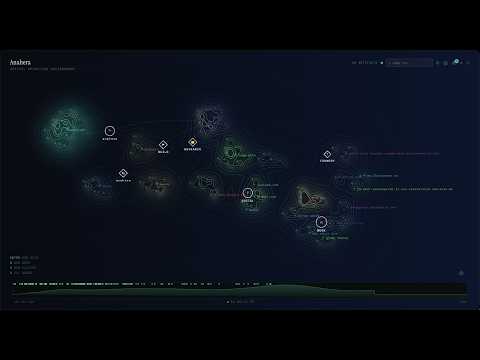
Too many tabs open and no idea what half of them are anymore? Anahera turns your tabs, bookmarks, and notes into a living visual map you can actually navigate, instead of a list you scroll past and forget. See it in motion at anahera.space Anahera Aloft is the Chrome extension. It opens the Anahera canvas in Chrome's side panel, so your spatial workspace is always a click away, alongside whatever you're browsing. When you need more room, the ⤢ button opens the full Anahera canvas in a dedicated browser tab. Pages you capture become cards. Cards form clusters. Clusters anchor to nodes you place. The structure is yours to build, Anahera handles the physics. --- HOW PAGES REACH YOUR CANVAS Right-click any page and choose "Add to Anahera" capture any page instantly and land on your canvas immediately. Add your own note to any card to remember why it mattered. Auto-capture: spend 30 seconds on a page and Anahera quietly queues it. Auto-captured pages don't land on the canvas directly, they wait in your inbox for review first. You decide what earns its place. Incognito tabs are never captured. Known banking and sign-in pages are excluded. --- THE SPATIAL STRUCTURE Nodes: place a node anywhere on the canvas. Give it a name and an emoji. Nodes are fixed spatial anchors: clusters dock to them, filaments tether toward them, and they stay visible at every zoom level. A node is how you know where you are. Clusters: groups of cards. Auto-captured pages from the same domain arrive in a cluster automatically. You can rename clusters, create your own, and dock them to a node. Cards drift toward their cluster's centroid based on recency: recently visited cards stay warm and close, older ones cool and settle further out in an age gradient. Artifacts: individual captured page or note. Lives inside a cluster (or drifts as an orphan if not yet in one). Position within the cluster reflects heat. Filaments: bezier tethers that connect each card to its cluster centroid. They shift color and width as tension grows. Cluster edges: soft color fills that mark each cluster's territory on the canvas, rendered from the structure of your data, never drawn by hand. --- A LIVING CANVAS Anahera is never still. The canvas breathes, drifts, and re-colors itself as you work, not as decoration, but as a readout of what you've touched and when. The one force behind all of it is heat. Heat is a value every card carries, from cold to hot, set purely by how recently you last visited it. Open a page and it flares to full heat. Leave it alone and it cools on a gentle curve, fully warm to fully cold over about two minutes at the normal setting (tunable to one or four). Nothing about heat is manual; it is the memory of your attention, made visible. Because heat eases toward its target a little every frame, every change you see is a smooth morph, never a snap. Cards glow and settle by heat. A cold card sits dim and translucent, receded into the background. As it warms it saturates and lifts a soft halo of light around its edges. A hot card burns vivid and wears a slow pulsing ring, a 2.2-second breath in and out, so the thing you just touched is unmistakable in a crowd. The colors themselves are alive: a card doesn't jump between states, it slides through them as its heat rises and falls. Cards drift. Each card is pulled toward its cluster's center, and heat decides how close it holds. Recently visited cards stay warm and near the heart of their cluster; as they cool they loosen and drift outward, settling into an age gradient, a ring of recency around every cluster. Watch a cluster over a session and you can read its history in the spacing alone: the near ones are now, the far ones are then. Filaments curve and strain. The tethers linking each card to its cluster center aren't straight lines, they bow with a gentle bezier curve, and they respond to tension. A relaxed filament is thin and calm in the cluster's color. Stretch a card far from its center and its filament thickens with heat, then shifts from the cluster hue through orange to red as the strain grows, pulsing at its most stretched. Distance becomes something you can feel, not just measure. The field contours ripple. Underneath everything, Anahera renders the combined heat of your canvas as a topographic field, luminous contour lines, like elevation on a map, tracing the shape of where your attention pools. Warm regions rise into brighter, tighter, higher rings; cold expanses flatten and dim. Nodes and clusters anchor the terrain so it stays legible even as individual cards move. As you work, the whole topology flows and re-forms, a slow weather over your workspace. The palette can shift in time. Scrub the Chrono Slider back and the entire canvas slides toward a warm amber, the color of the past, so you always know when you're looking at a memory rather than the live present. None of this is animation for its own sake. Every glow, drift, curve, and color is derived from real structure you created, what you opened, when, and where you put it. The canvas moves because your work moves, and it whispers that intelligence rather than announcing it. --- NAVIGATION Wayfinding bar: type to search your nodes, clusters, and cards from anywhere. Click a result and the camera flies there. Node results appear first, they're your primary spatial anchors. Key A: zooms out to fit all your nodes on screen and flashes them briefly. A spatial "where are my anchors?" signal, no panel needed. Double-tap any node: the camera zooms in to frame that node and all its connected clusters. A detail panel opens with the node as the header and its clusters listed below. Click any cluster in the list to jump and zoom directly to that cluster and its artifacts. Click the node header to return the camera to the full node scope. Chrono Slider: scrub back through the last 30 minutes of your canvas. See what your workspace looked like at any earlier moment, without changing anything. --- NOTES Create a text note and place it on the canvas and drag and drop it to a cluster. Notes are first-class artifacts: they live alongside your links, belong to clusters, and open a markdown editor when selected. Your writing and your browsing in the same space, positioned by the same physics. --- ZOOM AND DETAIL The canvas adapts what it shows to how close you are. Zoom out far and every card becomes a colored dot, the field topology takes over and the overall shape of your work is visible at a glance. Zoom in to the working range and cards compact to show their cluster tag and title. Zoom closer and full cards appear with title, date, and favicon. At maximum zoom, a description strip reveals itself beneath each card, the page's own meta description, or an inferred content type when no description is available. Through all of this, nodes never fade. Their emoji and label hold their size at every zoom level, fixed points you can read from anywhere on the canvas. They are how you know where you are whether you're looking at the whole map or a single card. Cluster labels work the same way but sit quieter: smaller, more subdued in color, always present. Nodes orient first. Clusters orient second. The card height animates smoothly between sizes as you zoom, so the transition never feels like a mode switch. --- INBOX TRIAGE Auto-captured pages wait in the inbox (Shift+I, or the badge on the toolbar button) until you review them. Select any combination, approve them to the canvas, or dismiss them. Approving a batch closes the inbox and flies the camera to where they landed. --- CANVAS VIEW Tune the visual weight of every layer on the canvas: cards, field contours, ambient glow, filaments, affinity links, cluster edges, and the background. Three presets. Minimal, Standard, Vivid or build your own with per-layer sliders. Settings persist across sessions. --- SETTINGS Heat decay speed: controls how quickly pages cool after you stop visiting them. Slow (4 min), Normal (2 min), or Fast (1 min). Export canvas: save your entire canvas to a file. Import it back any time to restore a previous state. Reset workspace: clear everything and start over. --- FREE TO USE Every feature is yours from the first click: nodes, clusters, heat, fields, filaments, notes, and the chrono timeline. No account, no sign-up, no trial timer. Your canvas lives entirely in your browser's local storage, so nothing ever leaves your device. Anahera is pay-once, not a subscription. When it becomes a place you rely on, a single $20, one time lifts the page limit for good. No subscription, ever. The free tier covers your first 20 pages. --- PRIVACY For each page, auto-captured or manually clipped, Anahera collects only: page URL, page title, favicon URL, and dwell time. Anything else on a card is a note you write yourself. That is the complete list. Anahera reads no page content, no meta description, no page body HTML, no form inputs, no passwords, no cookies. Captured data is transferred in-browser via postMessage to the Anahera canvas, it never travels over the network. It is stored in your browser's localStorage only and never leaves your device. The extension sends no analytics or telemetry of any kind. Full policy: https://www.anahera.space/privacy --- GETTING STARTED 1. Click the Anahera feather icon to open the side panel. 2. On first open, choose whether to enable auto-capture. 3. Clip any page with right click and choose "Add to Anahera", it lands on your canvas immediately. 4. Auto-captured pages queue in the inbox. Review and approve them 5. Add note to the card to remember why it mattered. 6. Press C to create a Cluster and name it. 7. Cards belong to a Cluster, drag and drop a card onto a Cluster to add it in. 8. Press N to place a Node with an emoji. 9. Clusters belong to a Node and can belong to multiple nodes. Drag and drop a cluster onto a Node to create the connection. 10. Use the Wayfinding bar to search and navigate by Node, Cluster, or page title. 11. Press A to zoom fit all Nodes. Double-click a Node to zoom into it with its Clusters. Select a Cluster from the list to zoom into it showing the cards. Zoom in closer to see a card's note. Click the note bar to edit and add a note.
0 out of 5No ratings
Details
- Version0.10.11.0
- UpdatedAugust 15, 2026
- FeaturesOffers in-app purchases
- Size37.13KiB
- LanguagesEnglish (United Kingdom)
- DeveloperWebsite
Email
welcome@anahera.space - Non-traderThis developer has not identified itself as a trader. For consumers in the European Union, please note that consumer rights do not apply to contracts between you and this developer.
Privacy

Anahera Aloft has disclosed the following information regarding the collection and usage of your data. More detailed information can be found in the developer's privacy policy.
Anahera Aloft handles the following:
This developer declares that your data is
- Not being sold to third parties, outside of the approved use cases
- Not being used or transferred for purposes that are unrelated to the item's core functionality
- Not being used or transferred to determine creditworthiness or for lending purposes
Support
For help with questions, suggestions, or problems, visit the developer's support site