


Overview
Export WhatsApp Web chats locally to TXT, PDF, CSV, ZIP and HTML with multi-chat workflows and custom date ranges.
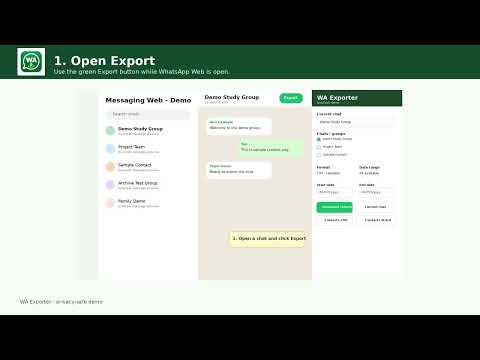
WA Exporter – Chats, Contacts & Backup WA Exporter is an independent Chrome extension that helps you export and organize information available in WhatsApp Web, directly from your browser. Export one chat or many, choose the dates you need, and save everything in formats suited to reading, archiving, spreadsheets, or record keeping. WA Exporter helps you save conversations, visible contacts and group-member information from your signed-in WhatsApp Web session. Choose what you need, set an available date range and download the results to your computer. **Chat backups** Save an individual conversation or select multiple chats and groups for a batch export. Each conversation is saved with its chat or group name. You can choose from preset date ranges, with custom start and end dates available in PRO. Choose a readable text backup, a printable PDF, a spreadsheet-compatible CSV file or an HTML archive. PRO can also bundle multiple chat backups into a ZIP download. The extension expands supported “Read More” messages during extraction and provides a resume option for interrupted exports. **Contacts and group members** Open a group you belong to or select groups from the exporter panel to save available member information. The export can include displayed names and phone numbers where WhatsApp makes those details visible to your account. PRO provides CSV files for working with contact information in spreadsheet applications and vCard files for importing available contact details into an address book. You can also export visible contact information from supported chat and group views. **Media and appearance** For HTML archives, PRO offers an option to embed accessible images. Other attachments may be represented by their names or media information rather than included as complete files. Switch the exporter panel between light and dark themes. The panel sits alongside WhatsApp Web so you can review your conversations while preparing an export. HTML archives also offer a dark appearance option. **Free and PRO** The free plan includes three successful single-chat text exports per day. PRO adds additional formats, batch processing, contact exports, custom date ranges, media options and interrupted-export resume. PRO costs $7.99 per month and allows one active device at a time. **Privacy and availability** Conversation and contact export processing takes place locally in your browser. Dodo Payments handles subscription checkout and license management separately; WhatsApp messages and contact lists are not sent to the payment provider. The extension works with your authenticated WhatsApp Web session and cannot bypass account permissions. Available history, contact details and media depend on what WhatsApp makes accessible in that session. Only export and use information you are authorized to access. WA Exporter is independent and is not affiliated with or endorsed by WhatsApp or Meta. Support: [support@waexporter.in](mailto:support@waexporter.in)
0 out of 5No ratings
Details
- Version7.7.7
- UpdatedOctober 15, 2026
- FeaturesOffers in-app purchases
- Size71.94KiB
- LanguagesEnglish
- DeveloperWebsite
Email
support@waexporter.in - Non-traderThis developer has not identified itself as a trader. For consumers in the European Union, please note that consumer rights do not apply to contracts between you and this developer.
Privacy

WA Exporter – WhatsApp Chat Export & Backup has disclosed the following information regarding the collection and usage of your data. More detailed information can be found in the developer's privacy policy.
WA Exporter – WhatsApp Chat Export & Backup handles the following:
This developer declares that your data is
- Not being sold to third parties, outside of the approved use cases
- Not being used or transferred for purposes that are unrelated to the item's core functionality
- Not being used or transferred to determine creditworthiness or for lending purposes
Support
For help with questions, suggestions, or problems, visit the developer's support site