

amgiflol

Übersicht
Figma-like Layout Inspector For Web
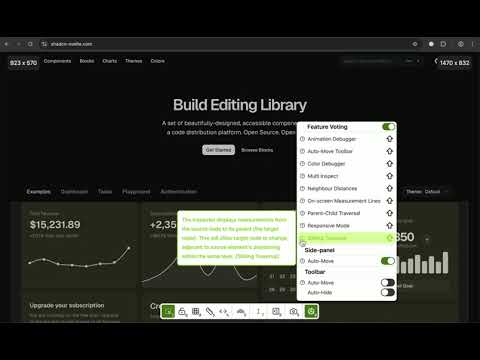
Tired of tedious manual checks and endless back-and-forth when verifying web designs? The Amgif Inspector streamlines the process, empowering designers and developers to achieve pixel-perfect implementations on any live webpage. Inspired by the "Inspect" functionality found in leading design tools, this extension bridges the gap between design mockups and live web implementations. This tool focuses on providing robust debugging for standard HTML tags and their computed CSS properties, giving you a foundational understanding of any webpage's structure and styling. (Note: Framework-specific debugging is not supported at this time, ensuring a focused and lightweight experience). Target Audience Front-end Developers: Debug layouts and catch spacing issues as you code UI/UX Designers: Validate live implementations against design specifications QA Engineers: Identify visual inconsistencies during testing cycles Product Managers: Review features with precise measurements and documentation Key Features Precision Tools Distance Measurements - Instantly see precise measurements between elements and parents Layer-to-Layer Measurements - Hold Alt/Option key to measure distances between any two elements Dynamic Rulers - Mouse-following coordinate system for precise pixel positioning Visual Overlays - Highlight elements and parent relationships for DOM understanding Smart Inspection Real-time Detection - Hover for immediate element information (tag, ID, classes) Side Panel - Detailed properties, computed styles, and attributes with auto-move Lock/Unlock Mode - Persistently track specific elements without losing focus Productivity Features Keyboard Shortcuts - Quick access to all features with intuitive shortcuts Design Mode - Edit text directly on screen for quick content adjustments Screenshot Capture - Save page state with active overlays for sharing Smart UI Positioning - Auto-hide/move interface to avoid obstructing view Advanced Visual Tools Rainbow Layouts - Colorful nested layer visualization for complex structures Floating Toolbar - Smart auto-positioning interface with minimal interference Feature Voting - Vote for features you want developed next Usage Scenarios During Development: Catch spacing/alignment issues while coding - eliminate guesswork, reduce debugging time Design Reviews: Verify implementation vs specifications with precise measurements and visual overlays QA Testing: Identify visual inconsistencies across browsers using systematic inspection tools Final Polish: Perfect pixel-level details before shipping with comprehensive measurement data Quick Start Guide Install - Add extension from Firefox Add-ons Navigate - Go to any webpage you want to inspect Activate - Click the extension icon in toolbar Inspect - Hover over elements for instant measurements Advanced - Use shortcuts or floating toolbar for more features Track - Lock elements for persistent monitoring Why Choose Amgif Inspector? Free & Open Source - Completely free to use with open source code available on GitHub No External Dependencies - Works entirely in browser, no login required for prototyping tools Instant Setup - No data sent to external servers, immediate productivity gains Workflow Integration - Active visual debugger for real-time development and design audits Professional Grade - Built for workflows where precision matters and time is valuable Current Status Keyboard Shortcuts: Continually refining for industry-standard usability Rainbow Layouts: Optimized for Chrome, Firefox enhancements in development Framework Support: Focused on standard HTML/CSS for lightweight experience User Feedback: Actively welcomed to shape future development Ready to achieve pixel-perfect web designs with ease? Install Figma Inspector today and transform your visual debugging workflow.
0 von 5Keine Bewertungen
Details
- Version0.3.4
- Aktualisiert1. August 2025
- Angeboten vonsm17p
- Größe1.59MiB
- SprachenEnglish
- Entwickler
E-Mail
support.amgiflol@sm17p.me - Kein HändlerDieser Entwickler hat sich nicht als Händler deklariert. Für Verbraucher in der Europäischen Union gelten die Verbraucherrechte nicht für Verträge, die zwischen dir und diesem Entwickler geschlossen werden.
Datenschutz

Dieser Entwickler erklärt, dass deine Daten
- nicht an Dritte verkauft werden, außer in den genehmigten Anwendungsfällen
- nicht für Zwecke genutzt oder übertragen werden, die nichts mit der Hauptfunktionalität des Artikels zu tun haben
- nicht zur Ermittlung der Kreditwürdigkeit oder für Darlehenszwecke verwendet oder übertragen werden
Support
Wenn du Hilfe bei Fragen, Vorschlägen oder Problemen benötigst, öffne diese Seite in deinem Desktop-Browser