


Overview
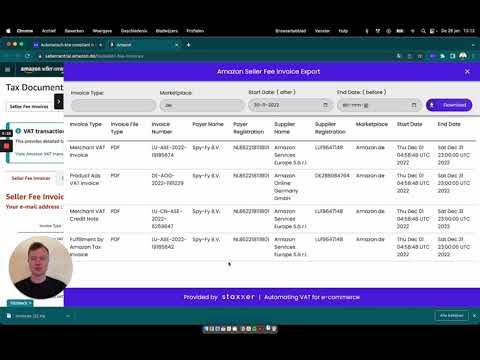
Bulk download your Amazon Seller Fee and Ads invoices with one click!
Download all your Amazon Seller Fee Invoices and Ads invoices in one go, as a single ZIP. Let's be honest: downloading Amazon invoices is a pain. You click, wait, download, repeat. For every invoice, every month. We got tired of it ourselves, so we built this. Pick your invoices, click the button and get everything as a ZIP. Free. Two kinds of invoices: - Seller Fee Invoices: the fees Amazon charges you for your sales, from Seller Central. As PDF, CSV or both. - Ads invoices: the cost of your advertising, from the Amazon Ads console. As PDF, plus the XLSX when available. What you get: - Works on every Amazon marketplace, in Europe and beyond - Filter by marketplace and date range - Privacy: files go straight from Amazon to your computer How it works: 1. Click Staxxer in your Chrome toolbar and choose Seller Central or Amazon Ads 2. On that page, click the purple Staxxer button on the right edge to open the sidebar 3. Pick a date range, filter if you like, and click Download Made by Staxxer. We handle VAT, EPR and bookkeeping for online sellers across Europe. We built this tool for ourselves first, but it was too handy not to share. Questions? Email support@staxxer.com
4.7 out of 513 ratings
Details
- Version1.2.1
- UpdatedOctober 16, 2026
- Size539KiB
- Languages2 languages
- DeveloperWebsite
Email
support@staxxer.com - Non-traderThis developer has not identified itself as a trader. For consumers in the European Union, please note that consumer rights do not apply to contracts between you and this developer.
Privacy

This developer declares that your data is
- Not being sold to third parties, outside of the approved use cases
- Not being used or transferred for purposes that are unrelated to the item's core functionality
- Not being used or transferred to determine creditworthiness or for lending purposes