


Overview
Flag suspected fake or competitor Amazon reviews and draft appeals. Seller Tools adds review requests and return analytics.
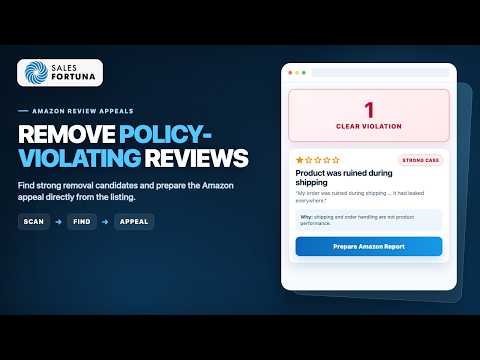
Amazon Review Tools for sellers combines a free AI Chrome extension for policy-based review appeals with connected SalesFortuna Seller Tools for compliant review requests and return-reason analysis. Suspected fake or competitor reviews hurt conversion, Buy Box performance, and PPC efficiency. The free extension helps Amazon sellers identify negative reviews that may violate Amazon's Community Guidelines and prepare evidence-based removal appeals without leaving the review page. --- REMOVE NEGATIVE REVIEWS (the core) --- Open an Amazon product or reviews page and the extension runs each review through an AI policy checker. If a negative review appears to break Amazon's Community Guidelines — off-topic content, profanity, competitor mentions, fake purchase signals, misplaced seller feedback — it's flagged with clear next steps: 1. SUBMIT REMOVAL REQUEST — opens Amazon's official report form for that review with the correct violation category pre-selected. 2. GENERATE APPEAL EMAIL — a ready-to-send draft for Amazon support with the review URL, ASIN, product title, violation category, and an AI-drafted policy argument. 3. ESCALATE TO SALESFORTUNA — hand edge cases to the SalesFortuna review-appeal team for a human second look. This is not a pay-to-delete service and it does not promise to remove every review. It helps you find reviews that genuinely appear to break Amazon policy and use Amazon's own reporting and appeal channels — you stay in control and within the rules. --- CONNECTED SELLER TOOLS (PAID) --- Connect Seller Central in the SalesFortuna dashboard to manage the wider Amazon review lifecycle: * REQUEST A REVIEW AUTOMATION — send Amazon's official Request a Review for eligible shipped FBA orders, once per order. Returned and excluded orders are skipped, and every attempt is logged. * RETURN-REASON ANALYSIS — see return rate and the top reason by ASIN, reason breakdowns, buyer comments, item disposition, and a recommended fix for periods up to 180 days. These connected-account features run in the SalesFortuna Seller Tools dashboard, not inside the Chrome extension. --- ALSO INCLUDED FREE --- * SELLER SNAPSHOT — an on-page panel on any product page: sales-rank, price & promotion history charts (7/30/90/180 days), estimated sales, and an FBA profit calculator. * KEYWORD RANK MONITORING — track where your products rank in Amazon search for your keywords and delivery locations, over time. * LISTING IMPROVEMENTS FROM REVIEWS — turns recurring themes in negative reviews into recommendations for clarifying the product promise, target customer, use case, and listing copy. Seller Tools accounts can continue into the full Listing SEO workflow. --- WHO IT'S FOR --- * Amazon private-label and brand-registered sellers * Vendor-central and account managers * Agencies managing client review profiles * PPC and account managers recovering conversion after 1-star reviews If one negative review just cost you the Buy Box, this is for you. --- ACCOUNT & LIMITS --- Create a free SalesFortuna account for up to 3 removal candidates and 1 listing improvement from reviews per day. No card or Amazon connection is required. Your account also keeps review tracking and appeal history. Seller Tools unlocks every candidate found, review-request automation, return-reason analysis, and the full Listing SEO workflow. --- TRUST & PRIVACY --- * The Chrome extension never collects Amazon credentials or reads Seller Central account data * Seller Tools accesses connected-account data only after you separately authorize the SalesFortuna dashboard through Amazon * Review analysis sends only review text and product ASIN to the SalesFortuna API * Product data used for history charts (ASIN, sales rank, price, promotions) is public and not linked to you * Tracking email is used only to notify you about reviews you track * No data is sold or used for advertising; all traffic is over HTTPS Clean listing. Better PPC. Higher CVR. Start with your worst review right now.
5 out of 58 ratings
Details
- Version0.7.77
- UpdatedNovember 12, 2026
- Size287KiB
- LanguagesEnglish
- DeveloperSales Fortuna LLCWebsite
8, The Green, Suite B Dover, DE 19901 USEmail
admin@salesfortuna.comPhone
+1 302-204-2333 - TraderThis developer has identified itself as a trader per the definition from the European Union and committed to only offer products or services that comply with EU laws.
Privacy

Amazon Review Tools: Remove Bad Reviews has disclosed the following information regarding the collection and usage of your data. More detailed information can be found in the developer's privacy policy.
Amazon Review Tools: Remove Bad Reviews handles the following:
This developer declares that your data is
- Not being sold to third parties, outside of the approved use cases
- Not being used or transferred for purposes that are unrelated to the item's core functionality
- Not being used or transferred to determine creditworthiness or for lending purposes