


Overview
Download main images from Amazon product pages. Premium adds variants, description images, videos, ZIPs, and folders.
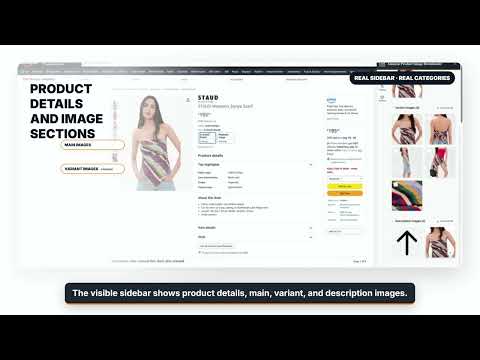
Download and organize product images from supported Amazon product pages in a few clicks. Amazon Product Image Downloader adds a convenient side panel to the product page you are viewing. It detects available product information and media, organizes the images into clear sections, and lets you preview and select the assets you need before downloading them. CORE FEATURES • Preview detected product details and specifications • View organized main, variant, and description image sections • Download individual main product images • Download an entire image section or only selected images • Select all images, invert the selection, or clear it • Optionally use Save As for greater control over file names PREMIUM FEATURES • Download variant and product-description images • Organize downloads into subfolders • Download selected assets as a ZIP archive HOW TO USE 1. Open a supported Amazon product page. 2. Click the extension and start the product-image workflow. 3. Review the detected product information and image sections. 4. Select one image, a complete section, or all required images. 5. Choose your download settings and save the files. Product videos may be previewed for eligible users when they are available on the page. Video downloading is not enabled in the current version. The extension uses the Product Media Downloader service for product parsing, account authentication, and premium access checks. Some features require an account and an eligible paid plan. Availability of images can vary by Amazon marketplace and product page. Amazon is a trademark of its respective owner. This extension is an independent third-party tool and is not affiliated with or endorsed by Amazon.
5 out of 51 rating
Details
- Version1.0.2
- UpdatedJuly 19, 2026
- FeaturesOffers in-app purchases
- Size244KiB
- LanguagesEnglish (United States)
- DeveloperWebsite
Email
support@browseraddons.com - Non-traderThis developer has not identified itself as a trader. For consumers in the European Union, please note that consumer rights do not apply to contracts between you and this developer.
Privacy

Amazon Product Image Downloader has disclosed the following information regarding the collection and usage of your data. More detailed information can be found in the developer's privacy policy.
Amazon Product Image Downloader handles the following:
This developer declares that your data is
- Not being sold to third parties, outside of the approved use cases
- Not being used or transferred for purposes that are unrelated to the item's core functionality
- Not being used or transferred to determine creditworthiness or for lending purposes
Support
For help with questions, suggestions, or problems, please open this page on your desktop browser