


개요
화이트리스트에 등록된 모든 브라우저 창을 가시성 상태 이벤트를 속이는 방식으로 활성 상태로 시뮬레이션하세요!
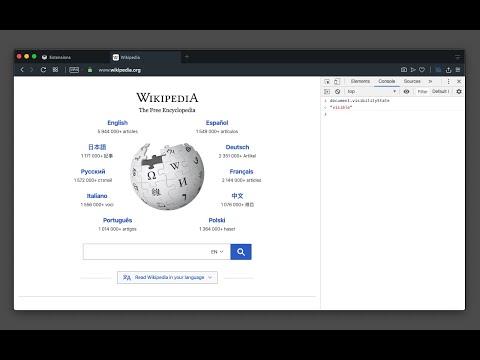
[Breaking Change] Version 0.4.0 and above. The extension must now be enabled for each hostname individually. This adjustment enhances the extension's performance, as the always-active feature can disrupt websites. To activate it, open the page requiring the always-active feature in a browser tab and click the action button once. The page will refresh, and the action button will turn blue. --- This extension protects against web pages tracking the activity state of the page. Some websites use this track to only offer services when the tab is active. By installing this extension a small script is injected into every webpage which overwrites the "document.visibilityState", and "document.hidden" properties to pretend the tab is always in the active state (document.visibilityState = 'visible' and document.hidden = false). This is useful for the webpages that check your visibility state before loading resources like many music webpages. By installing this extension even if the page is opened in the background page, the player will start immediately like the page is loaded on an active tab. Supported Trackings: document.mozHidden (only on Firefox browser) document.webkitHidden (only on Chromium browsers) Supported Events: 1. visibilitychange 2. webkitvisibilitychange (only on Chromium browsers) 3. mozvisibilitychange (only on Firefox browser) 4. blur (some websites require the user to keep the tab focused) 5. mouseleave (some websites use this method to make sure the user pointer is inside the window)
5점 만점에 4.0점평점 212개
세부정보
- 버전0.4.6
- 업데이트됨2025년 12월 16일
- 제공brian.girko
- 크기51.05KiB
- 언어언어 2개
- 개발자
이메일
brian.girko@gmail.com - 비판매자판매자로 식별되지 않은 개발자입니다. 유럽 연합에 거주하는 소비자의 경우, 이 개발자와 체결한 계약에 대해서는 소비자 권리가 적용되지 않을 수 있음을 유의해야 합니다.
개인정보 보호

개발자가 사용자 데이터에 관해 다음과 같이 선언했습니다
- 승인된 사용 사례를 제외하고 서드 파티에 판매하지 않음
- 항목의 핵심 기능과 관련 없는 목적으로 사용하거나 전송하지 않음
- 신용도 판단 또는 대출 목적으로 사용하거나 전송하지 않음
지원
질문, 제안 또는 문제와 관련하여 도움이 필요하시면 개발자의 지원 사이트를 방문하세요.