

AlphaFonts Font Inspector

Overview
Inspect fonts, typography, and CSS styles on any webpage.
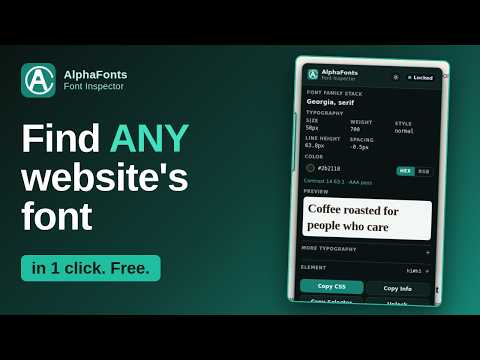
AlphaFonts Font Inspector shows you the typography behind any webpage in seconds. It is a free font finder and CSS inspector for designers, developers and SEO teams. HOW IT WORKS Click the AlphaFonts button (or press Alt+Shift+F) and choose "Start Inspecting". Hover over any text to see its font, size, weight, line height, letter spacing and color. Click to lock the panel, then copy the CSS, a plain-text summary, or the element's selector. WHAT YOU GET Font family stack, size, weight, style, line height, letter and word spacing, alignment, transform, decoration and color (HEX or RGB, transparency kept). "Label all text on page": a small label above every text element showing the properties you choose. Live editing: try a new size, weight, color and more on the page, with sliders and px / rem / em / unitless converters. Contrast checker with WCAG AA and AAA results and a one-click suggested passing color. "Copy changes" copies only what you edited. Every edited field has its own undo. Choose which properties to show, copy and label. Light and dark themes. Right-click menu (can be turned off), keyboard shortcut, and an options page. PRIVATE BY DESIGN Everything runs on your computer. The extension collects no data, makes no network requests, has no accounts and no analytics. Your settings (theme and chosen properties) are stored locally in your browser. GOOD TO KNOW It cannot run on Chrome's own pages or the Chrome Web Store (a browser rule for all extensions). Only the main page is inspected; text inside iframes is not.
0 out of 5No ratings
Details
- Version2.5.1
- UpdatedOctober 19, 2026
- Offered bytauseeq haider
- Size69.45KiB
- LanguagesEnglish
- Developer
Email
tauseeqhaider16133@gmail.com - Non-traderThis developer has not identified itself as a trader. For consumers in the European Union, please note that consumer rights do not apply to contracts between you and this developer.
Privacy

This developer declares that your data is
- Not being sold to third parties, outside of the approved use cases
- Not being used or transferred for purposes that are unrelated to the item's core functionality
- Not being used or transferred to determine creditworthiness or for lending purposes
Support
For help with questions, suggestions, or problems, visit the developer's support site