


개요
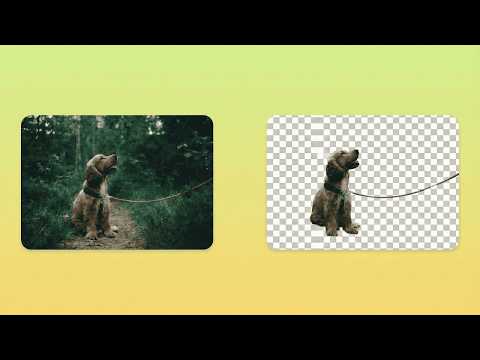
AI-powered background removal that runs entirely in your browser. Fast, private, and free.
AlphaDrop is a powerful background removal tool that runs completely in your browser. No uploads to external servers, no subscriptions, no limits - just fast, private, AI-powered image editing. FEATURES Two AI Processing Modes - Alpha Mode: Preserves soft edges and fine details like hair, fur, and semi-transparent elements. Ideal for portraits and complex subjects. - Object Mode: Creates clean, hard edges perfect for product photos, logos, and solid objects. Multiple Ways to Use - Right-click any image on the web and select "Remove Background" - Upload images directly from your computer - Process images one after another without refreshing Professional Refinement Tools - Feather: Soften edges for natural blending - Edge Adjust: Expand or contract the mask boundary - Smooth: Remove jagged edges and artifacts - Manual Eraser: Touch up specific areas with zoom support Additional Features - Crop tool for both original and processed images - Download results as transparent PNG - Session persistence - your work is saved if you close the popup - Large image support with automatic resize option PRIVACY FIRST AlphaDrop processes everything locally on your device: - Your images never leave your computer - No data is sent to external servers - No account required - Works offline after initial setup - No tracking or analytics HOW IT WORKS 1. Right-click any image on the web, or click the extension icon and upload an image 2. Select your preferred mode (Alpha for soft edges, Object for hard edges) 3. Click "Remove Background" and wait for processing 4. Use refinement tools if needed 5. Download your transparent PNG TECHNICAL DETAILS - Supports images up to 25 megapixels REQUIREMENTS - Chrome version 116 or later SUPPORT - AlphaDrop is free. CONTACT - alphadrop86@gmail.com
5점 만점에 5점평점 2개
세부정보
- 버전1.0.3
- 업데이트됨2026년 3월 6일
- 크기5.49MiB
- 언어English
- 개발자
이메일
aaryan.kandiah@gmail.com - 비판매자판매자로 식별되지 않은 개발자입니다. 유럽 연합에 거주하는 소비자의 경우, 이 개발자와 체결한 계약에 대해서는 소비자 권리가 적용되지 않을 수 있음을 유의해야 합니다.
개인정보 보호

개발자가 사용자 데이터에 관해 다음과 같이 선언했습니다
- 승인된 사용 사례를 제외하고 서드 파티에 판매하지 않음
- 항목의 핵심 기능과 관련 없는 목적으로 사용하거나 전송하지 않음
- 신용도 판단 또는 대출 목적으로 사용하거나 전송하지 않음