


Présentation
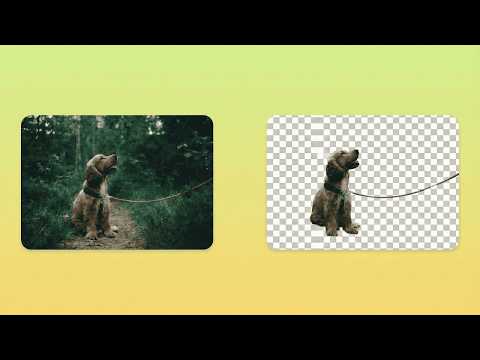
AI-powered background removal that runs entirely in your browser. Fast, private, and free.
AlphaDrop is a powerful background removal tool that runs completely in your browser. No uploads to external servers, no subscriptions, no limits - just fast, private, AI-powered image editing. FEATURES Two AI Processing Modes - Alpha Mode: Preserves soft edges and fine details like hair, fur, and semi-transparent elements. Ideal for portraits and complex subjects. - Object Mode: Creates clean, hard edges perfect for product photos, logos, and solid objects. Multiple Ways to Use - Right-click any image on the web and select "Remove Background" - Upload images directly from your computer - Process images one after another without refreshing Professional Refinement Tools - Feather: Soften edges for natural blending - Edge Adjust: Expand or contract the mask boundary - Smooth: Remove jagged edges and artifacts - Manual Eraser: Touch up specific areas with zoom support Additional Features - Crop tool for both original and processed images - Download results as transparent PNG - Session persistence - your work is saved if you close the popup - Large image support with automatic resize option PRIVACY FIRST AlphaDrop processes everything locally on your device: - Your images never leave your computer - No data is sent to external servers - No account required - Works offline after initial setup - No tracking or analytics HOW IT WORKS 1. Right-click any image on the web, or click the extension icon and upload an image 2. Select your preferred mode (Alpha for soft edges, Object for hard edges) 3. Click "Remove Background" and wait for processing 4. Use refinement tools if needed 5. Download your transparent PNG TECHNICAL DETAILS - Supports images up to 25 megapixels REQUIREMENTS - Chrome version 116 or later SUPPORT - AlphaDrop is free. CONTACT - alphadrop86@gmail.com
5 sur 52 avis
Détails
- Version1.0.3
- Dernière mise à jour6 mars 2026
- Taille5.49MiB
- LanguesEnglish
- Développeur
E-mail
aaryan.kandiah@gmail.com - Non-professionnelCe développeur ne s'est pas identifié comme professionnel. Pour les consommateurs de l'Union européenne, veuillez noter qu'il est possible que les droits des consommateurs ne s'appliquent pas aux contrats entre vous et ce développeur.
Confidentialité

Ce développeur déclare que vos données :
- Ne seront pas vendues à des tiers en dehors des cas d'utilisation approuvés.
- Ne seront ni utilisées ni transférées à des fins sans rapport avec la fonctionnalité de base de l'article.
- Ne seront ni utilisées ni transférées pour déterminer votre solvabilité ou en vue de vous proposer un prêt.