


總覽
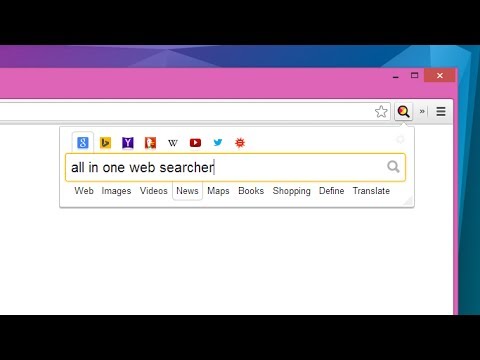
Search anything on the internet easily by typing into ONE unified search box
All in one web searcher allows to search any website easily by typing in one search box. All in one web searcher is a simple yet powerful extension to search multiple sites with ZERO click. Add sites to search, customize the order and search anywhere quickly. USING THE EXTENSION ---------------------------------- - Click the extension icon, simply hover over the search tabs and type the search term. - Press enter to search the keyword in the selected search engine. - Press "tab" or "alt" keys to cycle through tabs if needed. - Add custom search engine sites as you need. - Simple and quick way to search any page without a click ! FEATURES --------------- - Simple and fast UI for quick searches - Add multiple search sites easily and customize the order. - Add sub search sites like "Images" search, "Map" search etc. for easy search. - Keyboard shortcuts to cycle through the tabs. - Custom/Automatic icons for the tabs can be used. - No unwanted background process and memory. Light and fast extension. - Available in two themes - Text free extension and hence multilingual DEFAULT SEARCH ENGINES --------------------------------------- All popular search engines like Google, Bing, Wikipedia, DuckDuckGo are available out of the box. You can customize and add any search engine you want to this list with "sub search" engines like searching images, books, news etc. as needed. PRIVACY -------------- All in one web searcher extension does NOT collect any kind of information. The last used search keyword is saved locally. For any concerns, please contact me at aakashweb.com NOTE -------- After installing, please go to options page and change the "Tab selection method" to hover or click according as per your preference. Set a keyboard shortcut for opening the popup under "Manage extensions" page for even quicker search. CHANGE LOG ------------------- 5.0: - New: Move to manifest version 3.0 - New: Modernized search form styles. - Included new search engines as default. - Fix: Remove unused and old search engines from the default list. - Fix: Minor code refactoring - Fix: Last search term was not saved when button was clicked 4.1: - New option to open the results in new/same tab. - Minor enhancements to design and options page. - Updated jQuery and jQuery UI to the latest versions. - Fix issue where 'alt' key not cycling through tabs. - Replace deprecated events. 4.0: - Removed tabs permission. - Reorganized the assets used by the extension. - Updated default search URLs to HTTPS - Minor changes to the options page. 3.1: - Added feature to export and import search engine customization settings 3.0: - New simple Icon. - Reorder tabs easily. - Libraries updated to newest version. - Small interface changes. 2.0: - Core code re-written from bottom. - New Icon. - Instant popup load - Customize the default order of the list. 1.0: - Initial Version
4.5 分 (滿分 5 分)83 個評分
詳細資料
隱私權

這位開發者就你的資料做出下列聲明:
- 除經核准的用途外,不會將你的資料販售給第三方
- 不會基於與商品核心功能無關的目的,使用或轉移資料
- 不會為了確認信用度或基於貸款目的,使用或轉移資料
支援
如有疑問或建議,請使用電腦版瀏覽器開啟這個頁面