


Overview
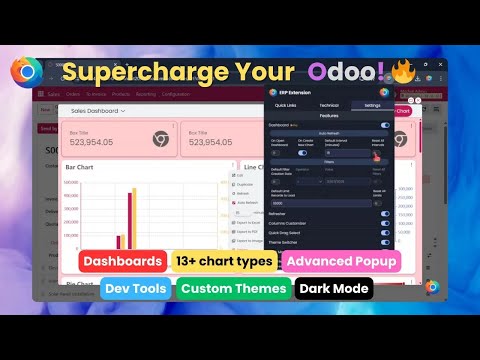
Supercharge your Odoo ERP with powerful AI tools, responsive dashboards, productivity features and support for all versions.
🛠️ Easy Setup & Compatibility ✅ Supports Odoo 11 through 19 (Community & Enterprise) ✅ Lightweight install – no server-side Odoo changes required ✅ Safe for production – extension affects only your browser session ✅ Unlimited – Use across any number of users, databases, and versions 📦 Just install and go – works seamlessly on any Odoo instance you’re logged into! 🔒 Your Privacy Matters ERP Extension runs entirely in your browser — no tracking, no data fetching, no external storage. All your ERP data stays private and stored locally on your device. 👨💼 Perfect for: ✅ Odoo users (Community or Enterprise) ✅ Consultants & developers ✅ Businesses who want to boost productivity 🌟 Key Features: 🤖 AI-Powered Tools (New) ● Spelling & grammar correction ● Writing style improvements ● Instant translations ● Quick text summarization ● AI prompt generator 📊 Advanced Dashboards & Analytics ● 13+ chart types: bar, pie, radar, scatter & more ● Build multiple dashboards with draggable, resizable blocks ● Auto-refresh support for real-time analytics ● Export dashboards as PDF, Excel, or high-res images 🎨 Custom Themes & Dark Mode ● Multiple modern themes included ● One-click switch between light and dark ● Your settings persist between sessions ⚙️ Productivity Boosters ● Drag-select and bulk-edit records faster ● Show/hide any column – even Odoo's non-optional ones ● Refresh views instantly, without reloading the page ● Developer popup: session info, views, list renderer, actions & more ❓ Frequently Asked Questions: ● Is it free? Yes – most features are free. Pro adds more. ● Does it change my Odoo? No – everything is local to your browser. ● Where’s my data? 100% stored locally in your browser. ● Need more info? See full FAQ: www.erpextension.com/#faq 📪 Contact Us: Have questions, suggestions, or feedback? We’d love to hear from you! 💌 contact@erpextension.com 🔗 Follow us: ● YouTube: https://www.youtube.com/@erpextension ● LinkedIn: https://www.linkedin.com/company/erp-extension 🔁 Changelog: 💡 Version 2.1.2 — 2026-05-23 ● Fixed dashboard charts data fetching compatibility with Odoo 19.2+ 💡 Version 2.1.1 — 2026-04-06 ● Disabled autocomplete on dashboard inputs for easier field selection ● Fixed fields loading bug in dashboard feature 💡 Version 2.1.0 — 2025-09-17 ● Added support for Odoo 19 (Community & Enterprise) 💡 Version 2.0.0 — 2025-09-04 ● Added powerful AI tools: spelling & grammar correction, writing style improvement, translation, summarization, and AI prompt generator 💡 Version 1.1.1 — 2025-07-09 ● Fixed dark mode issue in chatter section (Odoo 18 Enterprise) ● Resolved filename mismatch error with XLSX library on extension load 💡 Version 1.1.0 — 2025-06-28 ● Dashboard feature is now free (5 KPIs, 3 chart types) ● Chart previews unlocked for all chart types ● Developer tools fully free — no login required
5 out of 51 rating
Details
- Version2.1.2
- UpdatedMay 23, 2026
- FeaturesOffers in-app purchases
- Size1.0MiB
- LanguagesEnglish
- DeveloperERP EXTENSION LLCWebsite
30 N Gould St Ste N Sheridan, WY 82801 USEmail
contact@erpextension.comPhone
+1 307-998-5614 - TraderThis developer has identified itself as a trader per the definition from the European Union and committed to only offer products or services that comply with EU laws.
- D-U-N-S138593110
Privacy

All-in-One Odoo ERP Extension has disclosed the following information regarding the collection and usage of your data. More detailed information can be found in the developer's privacy policy.
All-in-One Odoo ERP Extension handles the following:
This developer declares that your data is
- Not being sold to third parties, outside of the approved use cases
- Not being used or transferred for purposes that are unrelated to the item's core functionality
- Not being used or transferred to determine creditworthiness or for lending purposes