

Tab Pilot — Search Tabs, History & Ask AI

Overview
Fast command palette for Chrome — fuzzy-search tabs, history, bookmarks & actions in one keystroke. Local-first, no account.
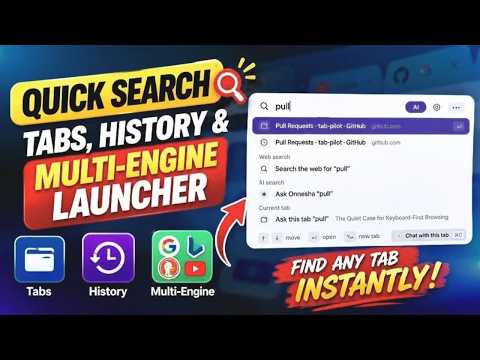
Press ⌥ + K or Ctrl +K. Find anything. You're there. Tab Pilot is a command palette for your whole browser — the keyboard-first launcher Arc's command bar and the abandoned Omni extension used to be, rebuilt fast and maintained with the POWR of AI. ONE KEYSTROKE TO ANY TAB Press Alt+K (⌥K) on any page to summon the palette, then fuzzy-search across your open tabs, browsing history, and bookmarks — ranked by frecency so the thing you want is usually first. Hit Enter and you're there. No mouse, no hunting through 40 open tabs. Tab groups are searchable by name, and a web-search row is always available, so the palette is never a dead end. RUN YOUR BROWSER FROM THE KEYBOARD • Tab actions — switch, close, pin/unpin, mute/unmute, duplicate, reopen last closed • Inline calculator — type 8*7+4, press Enter, the result is on your clipboard • Clipboard history (opt-in) — your last 50 copies, searchable, skips password fields, device-only • Text snippets — type a trigger like /addr in any field and it expands, with {date}, {time}, {cursor} and fill-in placeholders • Results teach their own shortcuts as you use them, so you get faster without reading a manual • Themes and layout — Auto, Slate, Paper, Cream or Ink, and a rebindable hotkey ASK AI ABOUT THE PAGE YOU'RE ON Open the side panel and chat with the current tab — Tab Pilot reads the page's visible text and answers grounded in it. Or use AI answers right in the palette. Nothing is ever sent until you explicitly ask a question. Tab chat asks for consent the first time, and mail, banking and sign-in pages are excluded automatically. PRIVATE BY DESIGN Local-first: your settings, snippets, and optional clipboard history live on your device and are never synced. No account for the core features, and no telemetry of any kind. Tab Pilot contacts a server only when you explicitly ask an AI question, or if you connect optional snippet sync. Clipboard history is off by default, skips password fields, and wipes when you turn it off. The privacy policy spells out exactly what leaves your browser when you do, including the parts most extensions would rather not mention: https://lukmannakib.com/tab-pilot/privacy COMING FROM OMNI OR ARC? Everything lives in the ⌥K palette — and you can rebind it to Ctrl/Cmd+Shift+K to keep your muscle memory. Free, complete, and without an account. No trial timers, no locked basics, no upsell.
0 out of 5No ratings
Details
- Version1.0.1
- UpdatedOctober 20, 2026
- Offered bylukman.nakib
- Size104KiB
- LanguagesEnglish
- Developer
Email
lukman.nakib@gmail.com - Non-traderThis developer has not identified itself as a trader. For consumers in the European Union, please note that consumer rights do not apply to contracts between you and this developer.
Privacy

Tab Pilot — Search Tabs, History & Ask AI has disclosed the following information regarding the collection and usage of your data. More detailed information can be found in the developer's privacy policy.
Tab Pilot — Search Tabs, History & Ask AI handles the following:
This developer declares that your data is
- Not being sold to third parties, outside of the approved use cases
- Not being used or transferred for purposes that are unrelated to the item's core functionality
- Not being used or transferred to determine creditworthiness or for lending purposes
Support
For help with questions, suggestions, or problems, please open this page on your desktop browser