


Overview
A simple alarm clock for Chrome. Set an alarm in seconds — plus world clocks, reminders and a focus timer. Private and offline.
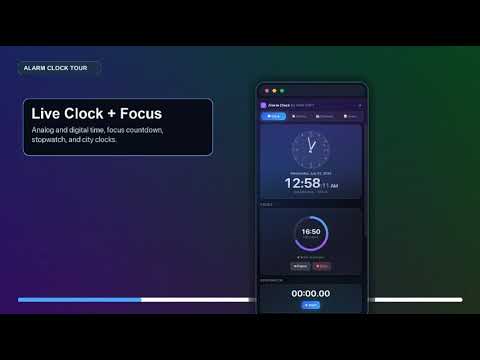
Click the icon, pick a time, press Set. That's the whole thing — no sign-up, no setup, no account. Version Update 1.1.0 NEW IN 1.1.0 : an alarm you can set without leaving the toolbar popup, a first-run check that proves notifications work before you depend on one, a real alarm window on macOS and Windows and Linux with working Snooze and Dismiss, and a genuinely complete translation into all 11 languages. Set alarm in seconds. Alarm Clock is the beautiful online alarm clock, timer, stopwatch and world clock for Chrome — with reminders, notes, a calendar and a focus timer, all in a stunning glass-dark design. Everything runs 100% locally on your device: no accounts, no tracking, no data collection. Available in 11 languages. ⏰ AN ALARM IN THREE CLICKS, SET ALARMS THAT JUST WORK • Time picker and repeat selector right in the toolbar popup — no extra windows • One-time, daily, weekday, weekend or custom-day repeating alarms • Set an alarm in ANY time zone — for global meetings and online classes • DST-safe: alarms follow wall-clock time and never drift with daylight saving • Alarms survive closing the popup, restarting Chrome and reloading the extension • 28 alarm sounds — bells, chimes, music box, piano, harp, marimba, birdsong, ocean waves, rain, classic ring, buzzer and more — or silent • Choose how long it rings: 30 seconds, 1 minute, 5 minutes, or until you dismiss it 🔔 AN ALARM THAT ACTUALLY REACHES YOU • Snooze and Dismiss on the desktop notification • On macOS, Windows, Linux — where Chrome's notifications drop action buttons — the alarm opens a real window with working Snooze and Dismiss instead • If your system blocks Chrome notifications entirely, the alarm still opens that window, and the extension shows you how to turn notifications back on • A first-run check confirms notifications work before you have to depend on one 🌍 WORLD CLOCK FOR EVERY CITY • Add any city, rename it, drag to reorder — see time in Tokyo, London, New York at a glance • UTC offset and day difference (Today / Tomorrow / Yesterday) always visible • Round analog clock + digital display — choose either or both ⏱ STOPWATCH & FOCUS TIMER • Full stopwatch with lap times — keeps counting even if you close the panel • Pomodoro-style focus timer: 15 / 25 / 45 / 60 min presets or any custom length • Animated progress ring, pause & resume, break suggestions, daily session count • Timestamp-based timekeeping — never loses a second 🔔 REMINDERS • Date-and-time reminders with notes • Mark complete straight from the notification • Overdue highlighting and a "Today" overview 📅 CALENDAR & 📝 NOTES • Month grid with event dots and a day agenda • Recurring events with multiple reminder offsets (10 min, 1 hour, 1 day before…) • Quick notes from the popup, pinning, instant search, links to alarms & events 🎨 MAKE IT TRULY YOURS • Dark, light or system theme + 5 accent colors (purple, blue, green, orange, pink) • Analog, digital or combined clock display • 12/24-hour time, seconds toggle, week start day • Tooltips everywhere, full keyboard navigation • Export/import all your data as a versioned JSON backup 🔒 PRIVACY FIRST — WORKS OFFLINE Your data never leaves your device and no internet connection is needed. Only five permissions (alarms, notifications, storage, offscreen, side panel) — no access to your browsing history, tabs, or any website. No ads, ever. 🌐 11 LANGUAGE OPTIONS English, Español, Português (Brasil), Deutsch, Français, हिन्दी, বাংলা, العربية, 日本語, Русский, 中文(简体— auto-detected from your browser, or pick one in Settings Not just the menus — every button, label, error message and notification, plus dates, times and numbers in your locale's own format and digits. Arabic runs right-to-left. 🔒 PRIVACY FIRST — WORKS OFFLINE Your data never leaves your device and no internet connection is needed. Five permissions (alarms, notifications, storage, offscreen, side panel) — no access to your browsing history, your tabs, or any website. No accounts, no tracking, no ads. Honest note: like every Chrome extension, Alarm Clock cannot wake a sleeping computer. Alarms fire while Chrome is running; anything missed during sleep fires when the device wakes. Perfect for: desk naps, work alarms, meeting reminders, online classes, pomodoro focus sessions, cooking timers, workout stopwatch, and keeping track of teams across time zones. Made with ♥ by NHR SOFT — www.nhrsoft.com
5 out of 51 rating
Details
- Version1.1.0
- UpdatedSeptember 3, 2026
- Size409KiB
- Languages11 languages
- DeveloperWebsite
Email
tigertclbd@gmail.com - Non-traderThis developer has not identified itself as a trader. For consumers in the European Union, please note that consumer rights do not apply to contracts between you and this developer.
Privacy

This developer declares that your data is
- Not being sold to third parties, outside of the approved use cases
- Not being used or transferred for purposes that are unrelated to the item's core functionality
- Not being used or transferred to determine creditworthiness or for lending purposes
Support
For help with questions, suggestions, or problems, please open this page on your desktop browser