

Capjin – Screenshot Genie

Overview
Capture the visible tab, an area or a full page, annotate it and save it to your folder. Screen video too. Keyboard first.
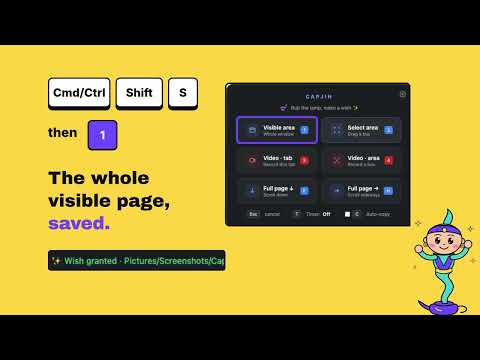
Capjin is your screenshot genie. Rub the lamp (Cmd/Ctrl+Shift+S or the toolbar icon), make a wish with one key, and the screenshot is captured, saved to your folder and opened in a quick editor. Everything runs on your computer. CAPTURE (free) • 1 – visible area of the tab • 2 – drag to select an area • 3 / 4 – record the tab or an area as a video (MP4 where Chrome supports it, otherwise WebM) • Auto-save to the folder you choose, with a file-name template ({AppName}_{date}_{time}_{n}), JPG, PNG or WebP • Optional auto-copy: every screenshot is also copied to the clipboard • Works with any keyboard layout, so you rarely need the mouse ANNOTATE (free) • Rectangle, rounded rectangle, circle, triangle, star, line and arrow • Text with bold, italic and strikethrough • Blur to hide private details • Line types: solid, dotted, dashed, wave • Colours, fill and opacity, move, resize and rotate, undo and redo, zoom • Copy to clipboard or save the annotated version CAPJIN PRO – one payment of $15, no subscription, refunds within 14 days on request • Full-page screenshots: scroll down or sideways and stitch automatically • Delay timer (3 / 5 / 10 s) for menus and tooltips • Pixelate, highlight focus (dim everything but the part that matters) and numbered step markers • Capture history: your last 10 captures, drag one back onto the image • Hand-drawn style: handwriting text and smooth arrows Refunds: email contact@nextaibusiness.com within 14 days of purchase. PRIVATE BY DESIGN Screenshots, videos and history stay on your device. Capjin has no account, no analytics and no tracking. The only network connection is the licence check for Pro, handled by ExtensionPay (payments by Stripe). HOW IT WORKS Capjin only touches the tab you are on, and only when you start a capture. It cannot run on chrome:// pages, the Chrome Web Store or the New Tab page. Support: contact@nextaibusiness.com Terms and refunds: https://capjin.nextaibusiness.com/terms
0 out of 5No ratings
Details
- Version0.5.2
- UpdatedNovember 12, 2026
- Offered bykongkanoksak
- Size177KiB
- LanguagesEnglish
- Developer
Email
kongkanoksak@gmail.com - Non-traderThis developer has not identified itself as a trader. For consumers in the European Union, please note that consumer rights do not apply to contracts between you and this developer.
Privacy

Capjin – Screenshot Genie has disclosed the following information regarding the collection and usage of your data. More detailed information can be found in the developer's privacy policy.
Capjin – Screenshot Genie handles the following:
This developer declares that your data is
- Not being sold to third parties, outside of the approved use cases
- Not being used or transferred for purposes that are unrelated to the item's core functionality
- Not being used or transferred to determine creditworthiness or for lending purposes
Support
For help with questions, suggestions, or problems, visit the developer's support site