


Overview
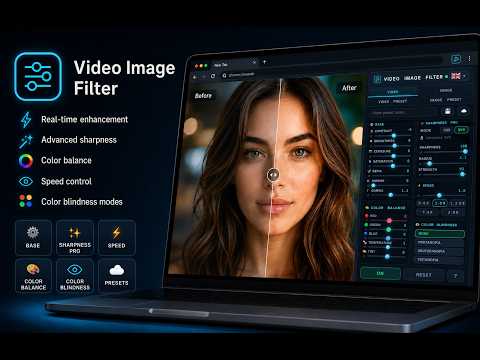
Control contrast, brightness, saturation, sharpness, color balance, and playback speed on any video and image in the browser.
🎬 VIDEO IMAGE FILTER 🌍🌎🌏https://www.videoimagefilter.com Transform videos and images directly in your browser. 🆕 What's New in Version 3.0.0: • 📸 Video Screenshot Capture: take crisp snapshots from any video with real-time active filters and save directly as PNG or JPG. • 👁️ Image Color Blindness Support: full simulation and correction for Protanopia, Deuteranopia, and Tritanopia across all web images. • ⚡ Streamlined UI: ultra-compact layout with sticky footer controls for instant, scroll-free access. ⭐ Why install Video Image Filter? ✅ Enhances videos and images in real time ✅ Provides advanced visual controls ✅ Adjusts video speed up to 4× ✅ Includes ready-to-use presets ✅ Lets you create custom presets ✅ Supports local saving and synchronization ✅ Includes color vision deficiency simulations ✅ Works on a wide range of websites ✅ Available in 54 languages ✅ Easily controlled from Chrome’s side panel ✨ View every piece of content exactly the way you prefer. Video Image Filter turns Chrome into a powerful visual control panel. Enhance web videos and images in real time, increase sharpness, correct brightness and colors, adjust playback speed, and create your own personal style with just a few clicks. No permanent changes are made to the content: filters are applied only while viewing it in the browser. 🌐 Works on YouTube, Netflix, Prime Video, Disney+, Twitch, and many other websites containing videos or images. ________________________________________ 🎥 Complete video control Customize your viewing experience by adjusting: ☀️ brightness ◑ contrast 🌈 saturation 📸 exposure 🍃 sepia effect 💡 gamma 🌡️ color temperature 🎨 tint and RGB balance 🪞 mirrored view ✨ sharpness, radius, and intensity ⚡ playback speed Make overly dark scenes clearer, intensify colors, improve details, or create a completely customized cinematic atmosphere. ________________________________________ 👁️ Color vision deficiency simulations Video Image Filter includes dedicated modes for simulating different color perceptions: 🔴 Protanopia 🟢 Deuteranopia 🔵 Tritanopia A particularly useful feature for: 🎨 designers 💻 web developers 📱 content creators ♿ accessibility professionals 🧪 anyone who wants to check color readability ________________________________________ 🔍 Advanced sharpening Choose the mode that best suits your needs: ⚡ CSS Mode Lightweight, fast, and designed to keep playback smooth. 🔬 SVG Mode More advanced and ideal for precise control of sharpness, colors, and visual effects. ________________________________________ ⚡ Video speed from 0.1× to 4× Slow down videos to examine every detail more closely, or speed up lessons, tutorials, conferences, and long-form content. Use the full slider or quickly select: 🐢 0.5× ▶️ 1× ⏩ 1.25× ⚡ 1.5× 🚀 2× 🛸 4× The extension maintains the selected speed even on players that attempt to reset it automatically. ________________________________________ 🖼️ Enhance web images too Video Image Filter is not limited to videos. It includes a separate panel dedicated to images displayed on web pages. Easily adjust: 📸 exposure ☀️ brightness ✨ highlights 🌑 shadows ◑ contrast ⚫ black point 🌈 saturation 💎 vibrance 🌡️ temperature 🎨 tint 🔴 red 🟢 green 🔵 blue 🔎 sharpness 📐 definition Enhance photographs, illustrations, previews, product images, and graphic content directly while browsing. ________________________________________ 🎨 Ready-to-use video presets Instantly achieve your desired style with a single click: 🎬 Cinema ✨ Vivid ⬛ Black and White 🌅 Warm ❄️ Cool 📷 Vintage 🌙 Night 🔄 Full Reset ________________________________________ 🌈 Dedicated image presets Images also have quick adjustment options: 🖼️ Natural 🌈 Vivid ⚫ Black and White ☀️ Warm 🧊 Cool 🔍 Sharp 📸 Vintage 🔄 Full Reset ________________________________________ 💾 Create and save your presets Have you found the perfect combination? Save it as a custom preset and reuse it at any time. 1️⃣ 💾 Local saving Keep your presets on the device you are currently using. 2️⃣ ☁️ Chrome synchronization Access your configurations on other computers connected to your Chrome account. You can create separate presets for videos and images, give them a name, and apply them with a single click. ________________________________________ 🔄 Works on dynamic pages too The extension automatically detects new videos and images loaded while you browse. It is designed to work with: ▶️ dynamic video players 🧩 embedded content 🖥️ pages that update without reloading 📺 streaming platforms 🌐 modern websites with progressively loaded content ________________________________________ 🌍 Interface available in 54 languages Video Image Filter automatically detects the browser language and provides a simple, intuitive multilingual interface. 🌐 Ideal for users worldwide. ________________________________________ 💡 Easy to use 1️⃣ Install the extension. 2️⃣ Open a website containing a video or images. 3️⃣ Click the Video Image Filter icon. 4️⃣ Adjust the settings from the side panel. 5️⃣ Save your favorite preset. All main settings are automatically saved in the browser. ________________________________________ 🎬 Install Video Image Filter and turn every web video and image into a visual experience tailored to you. 🌐 Support and information: www.videoimagefilter.com 🔒 PRIVACY & SECURITY — Privacy by Design This extension was created with user privacy as its highest priority. Video Image Filter operates entirely locally on your computer. The extension does NOT read, collect, store, or transmit your personal data, passwords, cookies, or web browsing history to external servers. The “Read and change all your data on all websites” permission is used exclusively to technically identify video and image tags on the pages you visit and apply the visual filters you have selected. No tracking and no hidden advertising.
5 out of 51 rating
Details
- Version3.0.0
- UpdatedAugust 30, 2026
- Size347KiB
- Languages54 languages
- DeveloperWebsite
Email
federicobertini.help@gmail.com - Non-traderThis developer has not identified itself as a trader. For consumers in the European Union, please note that consumer rights do not apply to contracts between you and this developer.
Privacy

This developer declares that your data is
- Not being sold to third parties, outside of the approved use cases
- Not being used or transferred for purposes that are unrelated to the item's core functionality
- Not being used or transferred to determine creditworthiness or for lending purposes
Support
For help with questions, suggestions, or problems, please open this page on your desktop browser