

Vocaby Capture

Overview
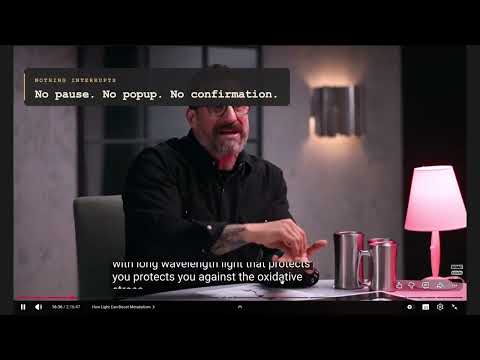
Click a word in any subtitle to save it. The meaning arrives on your phone.
REQUIRES THE VOCABY APP. This extension is a companion to Vocaby — it is not a standalone dictionary. It has no sign-in of its own: you pair it once from the app, and the words it captures are analysed and studied there. Without the app and a Vocaby account on the Max plan, this extension cannot capture anything. AVAILABLE NOW FOR ANDROID, WINDOWS AND LINUX. Mac, iPhone and iPad are coming soon. Android — https://play.google.com/store/apps/details?id=ai.princip.vocaby Windows and Linux — https://vocaby.ai/#download Vocaby turns any word you meet on the web into a word you are learning. Click a word in a subtitle while it is still on screen. Nothing opens, nothing pauses, nothing asks you to confirm — the word is taken and the meaning arrives in your Vocaby notebook after the scene, so looking something up costs you no part of what you were watching. WHAT IT DOES • Click a word in a subtitle on any video site. Click up to two more within a few seconds and they become one lookup, which is how you take a phrase. • Turn a site on for reading and its paragraphs become clickable the same way. Off by default, and per site — an article is also navigation, bylines and comments. • The popup is a notebook, not a receipt: the day's tally and every word you took, with what became of it and where you met it. • Words from one film, video or article arrive together once you stop capturing from it, instead of one notification per word. • Anything the network dropped is one tap to retry, with the sentence it came from intact. WHAT YOU NEED, AND HOW IT CONNECTS • The Vocaby app — on Android, Windows or Linux today; Mac, iPhone and iPad are coming soon. • A Vocaby account on the Max plan — connecting a browser is part of that plan. Pairing takes one step and happens once. Open Capture in the app, then either scan the QR code the extension shows or type the six-character code underneath it. On a computer the typed code is the whole procedure, since there is no camera to point. The browser is handed a capture key and nothing is typed twice. You can see every connected browser in the app and disconnect any of them — the extension notices immediately and says so rather than failing quietly. On its own, with no app and no pairing, this extension does nothing but show you that code. WHAT IT DOES NOT DO It does not read pages you have not asked it to. It does not run on a site until you either click a word in its subtitles or switch reading on for that site. It shows no ads and sells nothing.
0 out of 5No ratings
Details
- Version0.1.0
- UpdatedOctober 31, 2026
- Offered byHarun Keleşoğlu
- Size223KiB
- Languages9 languages
- DeveloperHARUN KELEŞOĞLU
59 Pl. Voltaire 2.floor Lyon 69003 FREmail
info@vocaby.aiPhone
+33 7 54 81 17 80 - TraderThis developer has identified itself as a trader per the definition from the European Union and committed to only offer products or services that comply with EU laws.
Privacy

Vocaby Capture has disclosed the following information regarding the collection and usage of your data. More detailed information can be found in the developer's privacy policy.
Vocaby Capture handles the following:
This developer declares that your data is
- Not being sold to third parties, outside of the approved use cases
- Not being used or transferred for purposes that are unrelated to the item's core functionality
- Not being used or transferred to determine creditworthiness or for lending purposes
Support
For help with questions, suggestions, or problems, visit the developer's support site