


Overview
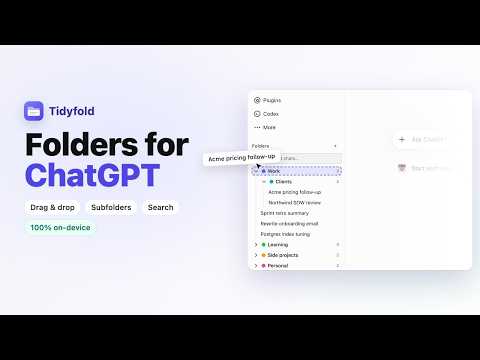
Organize ChatGPT chats into folders and subfolders. Private by design: no account, no cloud, your chats never leave your device.
Tidyfold adds folders to ChatGPT. Organize your ChatGPT chats into folders and subfolders, right in the sidebar, and find any conversation again in seconds. It is the chat organizer ChatGPT never shipped: nested folders, drag and drop, search, and nothing leaves your device. WHY YOU NEED IT ChatGPT's sidebar is one long list sorted by date. After a few hundred conversations, anything older than a week is effectively lost unless you remember its exact title. Projects help a little, but they are flat, heavy, and can't be nested. Tidyfold gives you real folders that sit above your Recents and stay out of the way. WHAT YOU GET • Folders and subfolders, nested as deep as you like, each with a color and a chat count • File a chat three ways: drag it from Recents onto a folder, right-click it, or click the folder icon that appears on every chat row • A searchable "Move to folder" menu that also creates a new folder as you type • One-click "Save chat" for the conversation • Drag folders to reorder them, nest them, or pull them back to the top level • Search across every saved chat; titles stay in sync when ChatGPT renames a conversation • Matches ChatGPT's light and dark themes automatically • Export and import all your folders as a JSON file PRIVATE BY DESIGN Tidyfold asks for one permission: storage, to save your folders on your device. • No account, no sign-up, no cloud • It never reads your messages, your cookies, or your ChatGPT session • Your folder names, chat titles and links never leave your device • Anonymous usage statistics (which features get used, never titles, URLs or anything you type) help improve Tidyfold. One switch in the popup turns them off. Your folders are labels stored in your browser. Chats stay where they are in ChatGPT, and uninstalling removes everything. HOW IT WORKS 1. Install Tidyfold and open chatgpt.com 2. A "Folders" panel appears in the sidebar above Recents. Click + to create your first folder 3. Drag a chat in, or right-click any chat and choose "Move to folder" 4. Click a saved chat to open it, or type in the search box to filter WORKS ON chatgpt.com and chat.openai.com. Support for Claude and Gemini is coming next. Tidyfold is an independent project and is not affiliated with OpenAI. ChatGPT is a trademark of OpenAI. Privacy policy: https://tidyfoldapp.com/privacy/ Website: https://tidyfoldapp.com/
5 out of 54 ratings
Details
- Version0.2.0
- UpdatedOctober 6, 2026
- FeaturesOffers in-app purchases
- Size66.7KiB
- LanguagesEnglish
- DeveloperWebsite
Email
support@tidyfoldapp.com - Non-traderThis developer has not identified itself as a trader. For consumers in the European Union, please note that consumer rights do not apply to contracts between you and this developer.
Privacy

Tidyfold: Folders & Search for ChatGPT has disclosed the following information regarding the collection and usage of your data. More detailed information can be found in the developer's privacy policy.
Tidyfold: Folders & Search for ChatGPT handles the following:
This developer declares that your data is
- Not being sold to third parties, outside of the approved use cases
- Not being used or transferred for purposes that are unrelated to the item's core functionality
- Not being used or transferred to determine creditworthiness or for lending purposes
Support
For help with questions, suggestions, or problems, please open this page on your desktop browser