

YouScroll — Scroll Comments, Doodle, GIFs & Face Effects

Overview
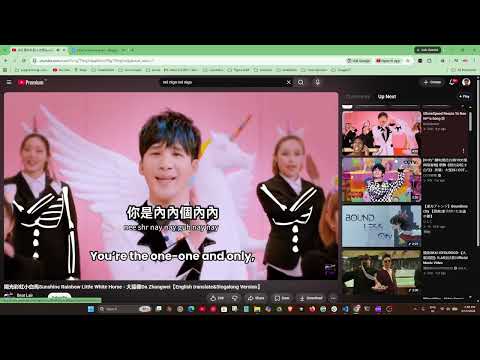
Scroll YouTube comments and Up Next beside the video. Doodle, drop GIFs, throw things and add face stickers on top, all on-device.
✨ Scroll Comments and Up Next without losing the video. YouScroll turns the YouTube watch page into a more useful space. Comments and recommendations share a full-height, tabbed panel beside the player and scroll independently. Open Play for local drawing, GIF, throwing and face-effect tools layered over the current video. 🎬 HOW IT WORKS 1. Install it and open a watch page. 2. The right-hand column is now a full-height panel with two tabs: Comments and Up Next. Scroll either one without moving the player. 3. Click Play to open the Video playground. It starts on Doodle, followed by GIFs, Throw and Faces. 4. Draw, place a GIF, throw an effect or choose a face sticker. Close the playground at any time to return normal video input. 5. Use the toolbar popup to switch features on or off and choose which right-column pane opens first. 🧰 CORE FEATURES - 📌 Independent panel: Comments and Up Next are one click apart. Each pane has its own scroll, and more comments keep loading as you reach the bottom. - 🎨 Doodle first: Play opens directly to a pen and eraser with six colors, adjustable size, Undo (Ctrl+Z) and Clear all. - 🎞️ GIF overlays: start with one of ten included reaction GIFs or import your own, then drag it over the video and change its size. Up to four GIFs can play together. YouScroll tries a lossless optimization on your device and uses it only when it is smaller; pixels, resolution, frames, timing and transparency stay unchanged. An already optimized file is kept as it is. - 💾 Saved GIFs: reusable files stay in this browser's local extension storage. The shelf holds up to 12 files and 6 MiB of encoded GIF data. A valid GIF that does not fit still works on the current video; it simply is not added to the shelf. Imports support up to 64 MiB and 8 million pixels per frame, preserve the original resolution within those practical limits, and have no frame count or duration cutoff. - 🍅 Eight throwables: fling tomatoes, eggs, slime, confetti, flowers, hearts, stars or snowballs. Flight arcs, squash and particle bursts respect the browser's reduced-motion preference. - 😎 Face effects: local landmark tracking follows position and rotation. Choose a moustache, horns, hair, hero mask, pirate patch, Laser Eyes with a red charging glow, or a Super Saiyan power-up with the same red eye glow and a golden body aura. You can also import a local PNG, JPEG or WebP face image with size and placement controls. - 🪟 Pop-out player: the control-bar button opens the current video in the browser's Picture-in-Picture window. - ↔️ Mode-aware layout: the panel steps aside in theater mode, fullscreen, live chat and narrow windows. The Play button remains available in the player controls where supported. - ⚡ Instant, reversible controls: toolbar toggles apply to open tabs without a reload. Switching a feature off or navigating away returns the borrowed page elements to their original places. 🙌 WHO IT IS FOR Anyone who reads YouTube comments while the video is still playing: people following a tutorial, people watching a talk and reading the discussion beside it, and anyone who wants lightweight effects without uploading their media. 💡 WHAT PEOPLE USE IT FOR - Reading the comments on a tutorial without losing sight of the step. - Keeping the recommendations one click away instead of buried. - Drawing a quick note or reaction over a playing video. - Reusing a favorite GIF without uploading it to a service. - Adding animated throws or face-following effects for fun. - Watching in a floating window while working in another application. 🔒 PRIVACY YouScroll has no account, no server, and no analytics. It makes no network requests in this build and contains no remote code. Granted site access is limited to www.youtube.com. Settings use Chrome sync. GIFs you explicitly import may be saved in local extension storage on this browser; they never sync or upload. Doodles, on-screen placements and imported face images stay in tab memory. Face tracking starts only after you choose a face sticker. It temporarily samples video pixels on your device with a detector bundled in the extension. Frames and face geometry are not saved or transmitted, and the feature does not recognize identity. Profiles, occlusion, quick cuts and videos that block pixel reads can interrupt tracking. No comment text, video title, channel name or watch history is read, logged or transmitted. See the privacy policy for the complete local-processing and storage details.
0 out of 5No ratings
Details
- Version1.0.1
- UpdatedOctober 13, 2026
- Offered bycodecube99
- Size13.87MiB
- LanguagesEnglish
- Developerabhishek singh
HOUSE N0. 34 PANDHURNA, Madhya Pradesh 480334 INEmail
codecube99@gmail.comPhone
+91 89992 41433 - TraderThis developer has identified itself as a trader per the definition from the European Union and committed to only offer products or services that comply with EU laws.
Privacy

This developer declares that your data is
- Not being sold to third parties, outside of the approved use cases
- Not being used or transferred for purposes that are unrelated to the item's core functionality
- Not being used or transferred to determine creditworthiness or for lending purposes
Support
For help with questions, suggestions, or problems, visit the developer's support site